> For the complete documentation index, see [llms.txt](https://postica.gitbook.io/binding-system-3/llms.txt). Markdown versions of documentation pages are available by appending `.md` to page URLs; this page is available as [Markdown](https://postica.gitbook.io/binding-system-3/overview/two-ways-to-bind.md).

# Two Ways to Bind

From the Inspector with no code, or as a bind field in code.

{% hint style="success" %}
**Learn by doing:** [When to Declare a Bind Field](/binding-system-3/tutorials/bind-field.md) settles this comparison with a log line rather than an argument.
{% endhint %}

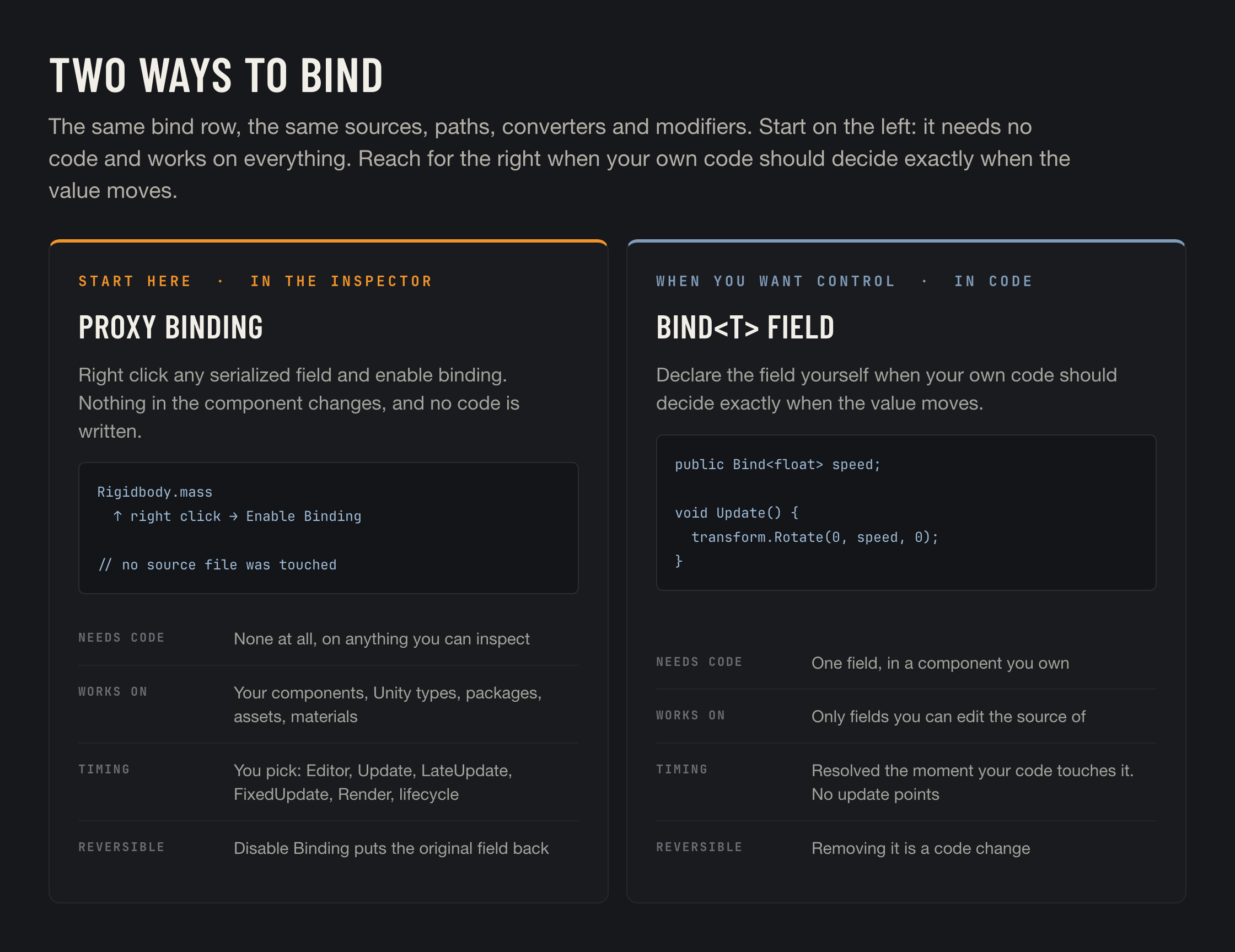
Binding System has two ways to connect a value, and knowing which is which from the start saves a lot of confusion later. They share everything downstream: the same bind row, the same eight [source modes](/binding-system-3/overview/sources.md), the same [paths](/binding-system-3/overview/paths.md), the same [converters](/binding-system-3/pipeline/converters.md) and [modifiers](/binding-system-3/pipeline/modifiers.md), the same [diagnostics](/binding-system-3/project-tools/diagnostics.md).

<figure><img src="https://3048705056-files.gitbook.io/~/files/v0/b/gitbook-x-prod.appspot.com/o/spaces%2FLUfBXR02sJ5i0MxwYbaV%2Fuploads%2Fgit-blob-a5117d86722c7c696df8ff1f790392ce280bcff7%2Ftwo-ways-to-bind.png?alt=media" alt="Proxy bindings versus Bind<T> fields"><figcaption></figcaption></figure>

{% hint style="success" %}
**Start with proxy bindings.** They need no code, work on every serialized field of every component and asset in the project, are reversible in one click, and give you the full set of update points. Reach for `Bind<T>` when you want your own code to decide exactly when a value moves.
{% endhint %}

## Proxy bindings: from the Inspector

Right click any serialized field, on any component or asset, and choose **Enable Binding**, then click the **hexagon toggle** that appears beside the label. The field is replaced by a bind row, and the binding is stored beside the object rather than inside it.

That hexagon is the same control a `Bind<T>` field has, which is the tidiest way to see the relationship between the two modes: **Enable Binding** gives an ordinary field the toggle a bind field already has.

No code is written, no type is changed, and the component being bound never learns that it happened. That is what makes this mode work on `Rigidbody.mass`, on a shader property, on a `ScriptableObject`, on a component from a package you cannot recompile, and on anything from the Asset Store.

Because the target component knows nothing about the binding, **the engine has to move the value**, and you say when:

<table><thead><tr><th width="230">Update point</th><th>When it runs</th></tr></thead><tbody><tr><td><strong>EDITOR</strong></td><td>Runs at edit time, without entering play mode.</td></tr><tr><td><strong>UPDATE</strong>, <strong>LATE UPDATE</strong>, <strong>FIXED UPDATE</strong>, <strong>RENDER</strong></td><td>Player-loop stages. Reads land before the stage, writes after it.</td></tr><tr><td><strong>ON ENABLE</strong>, <strong>ON AWAKE</strong>, <strong>ON START</strong>, <strong>ON DISABLE</strong>, <strong>ON DESTROY</strong></td><td>Lifecycle points on the owning object.</td></tr></tbody></table>

Any of these can run on an [interval](/binding-system-3/overview/modes-and-updates.md#intervals) rather than every frame, and [Optimized Update](/binding-system-3/overview/modes-and-updates.md#optimized-update) skips the work when nothing actually changed. Each point is described on [Bind Modes and Update Points](/binding-system-3/overview/modes-and-updates.md).

{% hint style="warning" %}
A new proxy binding comes with **UPDATE** and **Optimized Update** already ticked, so it runs as soon as it has a source and a path. Untick everything and nothing schedules it, and the panel tells you so. That state is [also a valid choice](/binding-system-3/overview/modes-and-updates.md#no-update-point-on-purpose) when you drive the binding from code or from a `UnityEvent`.
{% endhint %}

### Why this is the default answer

<table><thead><tr><th width="230">Property</th><th>What it means</th></tr></thead><tbody><tr><td><strong>No code, ever</strong></td><td>A designer can build and rewire connections without a programmer, without a recompile, and without a merge conflict in a <code>.cs</code> file.</td></tr><tr><td><strong>Works on everything</strong></td><td>Your own components, Unity's, packages, Asset Store plugins, <code>ScriptableObject</code>s, materials and shader properties. No source access required.</td></tr><tr><td><strong>Reversible in one click</strong></td><td>The hexagon toggle switches the binding off and back on <strong>without discarding its setup</strong>. <strong>Disable Binding</strong> removes it entirely and restores the original field. Trying an idea costs nothing either way.</td></tr><tr><td><strong>Explicit scheduling</strong></td><td>You choose the stage, the interval and whether to skip unchanged frames, per binding. Including edit time, which nothing else offers.</td></tr><tr><td><strong>Visible to the tools</strong></td><td>Every one of them is listed, searchable and graphable across the project. See <a href="/binding-system-3/project-tools/diagnostics/dependencies.md">Bindings Dependencies</a>.</td></tr></tbody></table>

### What it costs

The binding is scheduled whether or not anybody needs the value that frame, so it is the more expensive of the two by default. Intervals and Optimized Update close most of that gap, and [phased bindings](/binding-system-3/project-tools/performance/phased-bindings.md) apply here automatically.

It is also invisible from the source file. Someone reading `Rigidbody.mass` in code has no hint that a binding is driving it. The [proxy binding list](/binding-system-3/overview/proxy-bindings.md#seeing-what-an-object-drives) and [Bindings Dependencies](/binding-system-3/project-tools/diagnostics/dependencies.md) exist to answer that question.

Full details on [Proxy Bindings](/binding-system-3/overview/proxy-bindings.md).

## Bind fields: from code

The other way is to change a field's type to `Bind<T>` in a component you own, and author the connection in the Inspector as usual.

```csharp
public class Spinner : MonoBehaviour
{
    public Bind<float> speed = 90f.Bind();

    private void Update() => transform.Rotate(0f, speed * Time.deltaTime, 0f);
}
```

The defining property is that **your code controls the timing**. `speed` resolves at the instant you read it, and writes travel the moment you assign. Nothing is scheduled, nothing is polled, and a binding nobody reads costs nothing.

* Read it once in `Awake` and it resolves once.
* Read it inside a physics step and you get the value as of that step.
* Read it behind an `if` and it is not evaluated on the frames the branch is false.

Because the timing is yours, the **update points panel is not offered on a `Bind<T>` field**. There is nothing for the engine to schedule when your code has already said when.

{% hint style="info" %}
The one automatic option is **Auto Update**, under **Settings** in the bind menu. It registers the binding with the engine and refreshes it once per frame, between `Update` and `LateUpdate`. The stage is fixed and not selectable. Subscribing to `ValueChanged` turns it on implicitly, since something has to be watching for a change to report.
{% endhint %}

### What this mode buys you

<table><thead><tr><th width="230">Property</th><th>What it means</th></tr></thead><tbody><tr><td><strong>Cheapest at runtime</strong></td><td>No scheduling, no per-frame list, no work on frames where nobody asks.</td></tr><tr><td><strong>Exact timing</strong></td><td>The value is as fresh as the line that reads it. No pre or post stage to reason about.</td></tr><tr><td><strong>Visible in the type</strong></td><td><code>Bind&#x3C;float> speed</code> tells the next reader that this value comes from somewhere.</td></tr><tr><td><strong>Usable from code</strong></td><td>Build, rewire and inspect the binding at runtime. See <a href="/binding-system-3/overview/code.md">Binding from Code</a>.</td></tr></tbody></table>

### What it costs

The field has to be yours to change, somebody has to write and review that line, and the connection can no longer be added or removed by anyone who is not editing code. For a designer, this mode is closed.

## Choosing

<table><thead><tr><th width="330">The situation</th><th>What to use</th></tr></thead><tbody><tr><td>You are not sure</td><td><strong>Proxy binding.</strong> It is reversible, so being wrong is cheap.</td></tr><tr><td>The field belongs to Unity, a package or a plugin</td><td>Proxy binding, the only option</td></tr><tr><td>A shader or material property</td><td>Proxy binding, the only option</td></tr><tr><td>A field on a <code>ScriptableObject</code> or another project asset</td><td>Proxy binding</td></tr><tr><td>A designer needs to change the wiring</td><td>Proxy binding</td></tr><tr><td>You want the connection live while authoring the scene</td><td>Proxy binding, with the <strong>EDITOR</strong> update point</td></tr><tr><td>Your code already reads the value every frame</td><td><code>Bind&#x3C;T></code>. The read is the update, so it is free.</td></tr><tr><td>The value is read rarely, or conditionally</td><td><code>Bind&#x3C;T></code>. Nothing runs on the frames you skip.</td></tr><tr><td>The value must be exact at a precise moment in your own code</td><td><code>Bind&#x3C;T></code>, read at that moment.</td></tr><tr><td>The field is a documented input of a component you ship</td><td><code>Bind&#x3C;T></code>, so the type says so.</td></tr></tbody></table>

{% hint style="info" %}
Nothing forces a project to pick one. They coexist on the same GameObject and appear together in every diagnostics tool. The usual shape is proxy bindings for the bulk of the wiring, and `Bind<T>` on the handful of fields where a component's own code wants control.
{% endhint %}

## A third surface: UI Toolkit

UXML properties are bound the no-code way too. **Add BS3 Binding** in UI Builder writes a `BS3DataBinding` for the property, either onto the scene's `UIDocument` or into the `.uxml` asset. The value is driven by Unity's own UI Toolkit binding system rather than by the update points above. See [UI Toolkit and UXML](/binding-system-3/overview/ui-toolkit.md).

## Related pages

* [Proxy Bindings](/binding-system-3/overview/proxy-bindings.md): the no-code mode in full, including where it stores things.
* [The Bind Field](/binding-system-3/overview/binding.md): the row both modes share.
* [Bind Modes and Update Points](/binding-system-3/overview/modes-and-updates.md): direction and timing in full.
* [Binding from Code](/binding-system-3/overview/code.md): the `Bind<T>` API.
* [Bind Types](/binding-system-3/overview/bind-types.md): which bind type to declare.
