> For the complete documentation index, see [llms.txt](https://postica.gitbook.io/binding-system-3/llms.txt). Markdown versions of documentation pages are available by appending `.md` to page URLs; this page is available as [Markdown](https://postica.gitbook.io/binding-system-3/overview/ui-toolkit.md).

# UI Toolkit and UXML

Bind UXML element properties from UI Builder, with the same pipeline.

New in 3.0. A property of any `VisualElement` in a UXML document can be driven by a binding: same source modes, same paths, same converters and modifiers, same Live Debug. It works the other way round too: a [UI Document can be the source](#a-ui-document-as-a-source) of any binding, down to one element's style or USS class.

{% hint style="success" %}
**Learn by doing:** [A HUD in UI Toolkit](/binding-system-3/tutorials/uitoolkit-hud.md) builds a bound HUD from UI Builder and puts the two storage modes side by side.
{% endhint %}

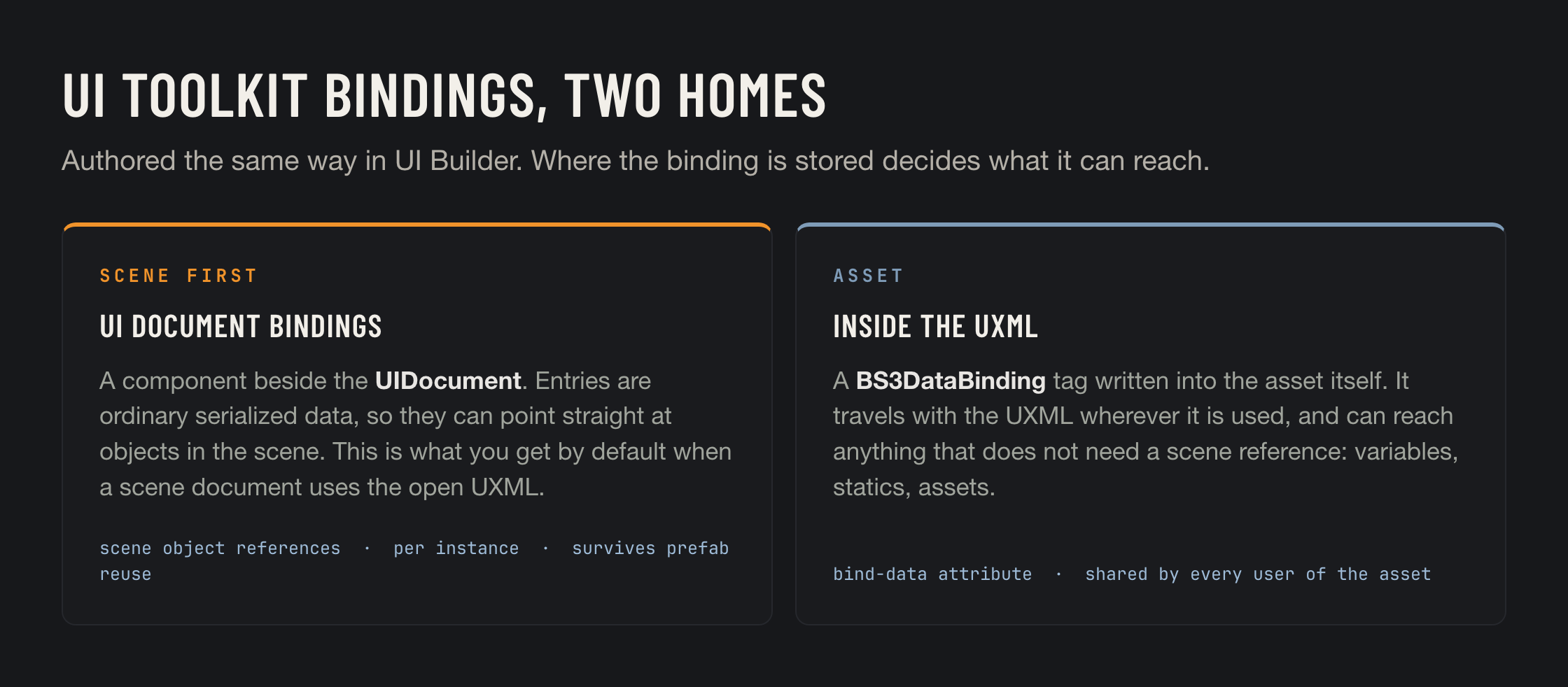
<figure><img src="https://3048705056-files.gitbook.io/~/files/v0/b/gitbook-x-prod.appspot.com/o/spaces%2FLUfBXR02sJ5i0MxwYbaV%2Fuploads%2Fgit-blob-fecc369453ce241867fb16345318cab63265a71f%2Fuitoolkit-storage.png?alt=media" alt="Scene-stored and asset-stored bindings"><figcaption></figcaption></figure>

## Adding a binding

1. Open the UXML in **UI Builder**.
2. Select an element.
3. **Right click the property field** in UI Builder's Inspector, for example `text` on a `Label`.
4. Choose **Add BS3 Binding**.

The bind popup opens already filled in: element, property, and the value type are all read from where you clicked. All that is left is to pick a source and a path, exactly as on any other bind field.

<figure><img src="https://3048705056-files.gitbook.io/~/files/v0/b/gitbook-x-prod.appspot.com/o/spaces%2FLUfBXR02sJ5i0MxwYbaV%2Fuploads%2FksQ5V4yKt612G2ZjWddx%2FScreenshot%202026-09-26%20at%2016.52.17.png?alt=media&amp;token=46a04f66-0081-4d50-a429-ac576115a3d8" alt=""><figcaption><p>Add BS3 Binding in UI Builder</p></figcaption></figure>

Right clicking a property that already has a binding offers **Edit BS3 Binding** and **Remove BS3 Binding** instead, so there is no way to end up with an accidental duplicate. Removal is offered even for a half-finished binding, which makes cleaning up a mistake one right click.

## Where the binding goes

This is decided for you, by what is in the scene, in this order:

<table><thead><tr><th width="330">Situation</th><th>Where the binding is stored</th></tr></thead><tbody><tr><td>Exactly one scene <code>UIDocument</code> uses this UXML</td><td>The binding is stored on that GameObject, in a <code>UIDocumentBindings</code> component created on demand. One click, nothing to choose.</td></tr><tr><td>Several <code>UIDocument</code>s use it</td><td>The menu lists them and you pick the destination once.</td></tr><tr><td>No scene document uses it</td><td>The binding is written into the UXML asset itself.</td></tr></tbody></table>

The scene is preferred because it can do more.

<table><thead><tr><th width="230"></th><th>Scene-stored</th><th>Asset-stored</th></tr></thead><tbody><tr><td>Can reference scene objects</td><td>Yes</td><td>No</td></tr><tr><td>Travels with the UXML</td><td>No</td><td>Yes</td></tr><tr><td>Element identified by</td><td>Name and hierarchy path</td><td>Its place in the document, or its name when it has one. No name is needed.</td></tr><tr><td>Shared between users of the asset</td><td>No, per instance</td><td>Yes</td></tr><tr><td>Stored as</td><td>Serialized data on the component</td><td>A <code>bind-data</code> attribute on a <code>BS3DataBinding</code> tag in the file</td></tr></tbody></table>

An asset binding belongs to the element whose `Bindings` block holds it, so at runtime it needs nothing to find its element. In the editor an unnamed element is found by its place: its type and its position among siblings of that type, level by level. When an element has a name, the name is what counts, since it survives the element being moved.

{% hint style="info" %}
An asset binding can still reach plenty: [bind variables](/binding-system-3/overview/bind-variables.md), [static members](/binding-system-3/overview/sources.md#static), project assets. What it cannot do is name an object that only exists in one scene.
{% endhint %}

## While you are in UI Builder

Bound rows show the Binding System hexagon in UI Builder's Inspector, so you can see at a glance which properties are driven.

When the open UXML is rendered by a `UIDocument` in a loaded scene, a pill appears in the viewport reading *Currently binding for \<GameObject>*, or naming the count when several documents use it. That tells you where the next **Add BS3 Binding** will land before you click it.

<figure><img src="https://3048705056-files.gitbook.io/~/files/v0/b/gitbook-x-prod.appspot.com/o/spaces%2FLUfBXR02sJ5i0MxwYbaV%2Fuploads%2F74Dt0TQB1OvWHIIGGeCz%2FScreenshot%202026-09-26%20at%2016.23.51.png?alt=media&amp;token=61554c24-935d-4080-b2b4-55a34ccf8aa9" alt="" width="563"><figcaption><p>The scene-link pill and the bound-row hexagons</p></figcaption></figure>

### Unsaved changes

An asset binding is written into the `.uxml` file, and UI Builder keeps its own edits in memory until you save. Writing the file underneath those edits would make UI Builder ask which version to keep, and either answer loses something. So nothing is written while the document has unsaved changes:

<table><thead><tr><th width="270">Where</th><th>What you see</th></tr></thead><tbody><tr><td>The bind popup</td><td>The <strong>Apply</strong> button reads <strong>Save and Apply</strong>, and a note above it says why. Pressing it saves the document in UI Builder first, then writes the binding.</td></tr><tr><td>Removing a binding</td><td>A notice in place, with a <strong>Save and Remove</strong> button.</td></tr><tr><td><strong>Edit in UI Builder</strong> on the component</td><td>A notice with <strong>Save and Edit</strong>.</td></tr></tbody></table>

The save is UI Builder's own. If it is cancelled, for example on the first save of a new document, nothing is written. The same save is what makes an element you have just created bindable, since until then it is not in the file.

Messages from the integration appear as short notices beside what you clicked, never as modal dialogs.

Bindings are deliberately **inert inside the UI Builder canvas**. Their sources cannot resolve in an authoring context, and a failing update would show as an unresolved binding on the field, so they simply do not run there.

## The UIDocumentBindings component

Sits beside the `UIDocument`, added automatically when needed. Its Inspector is where you review, validate and manage scene bindings.

<figure><img src="https://3048705056-files.gitbook.io/~/files/v0/b/gitbook-x-prod.appspot.com/o/spaces%2FLUfBXR02sJ5i0MxwYbaV%2Fuploads%2FdKnDRvJysuyM2IRowYbE%2FScreenshot%202026-09-26%20at%2016.32.29.png?alt=media&amp;token=caaa09a4-2888-41b3-aaa3-04e992819370" alt="" width="563"><figcaption><p>The UIDocumentBindings inspector</p></figcaption></figure>

<table><thead><tr><th width="270">Part</th><th>What it shows</th></tr></thead><tbody><tr><td><strong>Scene Bindings</strong></td><td>The entries stored here. Each one has an element picker, a property picker and a full bind row.</td></tr><tr><td><strong>UXML Asset Bindings</strong></td><td>A foldout listing the bindings embedded in the UXML, read-only, with a <strong>Remove</strong> button. So you can see both kinds in one place.</td></tr><tr><td><strong>Edit in UI Builder</strong></td><td>Starts a round-trip session, below.</td></tr><tr><td><strong>Finish Editing</strong></td><td>Ends that session.</td></tr><tr><td><strong>Validation</strong></td><td>Reports concrete problems: no Source Asset on the document, an element that cannot be found, a property that does not exist on the element type, a bind type that does not match the property type.</td></tr></tbody></table>

Bindings are applied when the component is enabled, and re-applied automatically whenever the document rebuilds its visual tree, for example when its `visualTreeAsset` is swapped at runtime. If you mutate the tree yourself, call `Reapply()`.

```csharp
var bindings = GetComponent<UIDocumentBindings>();
bindings.Reapply();
```

## The round-trip session

Scene bindings live on a component, but UI Builder only knows about the file. **Edit in UI Builder** bridges that: the component's entries are injected into the real `.uxml` as temporary tags, you edit them in UI Builder like any other binding, and the component is reconciled from the file on every save. **Finish Editing** strips the temporary tags.

The design is crash safe by construction. The component's list is never cleared during a session, and reconciliation only ever updates entries, never deletes them. At every instant either the component alone, or the component plus the tags, holds the data.

{% hint style="warning" %}
Two things end a session: entering play mode, and closing the scene that owns the component. Serialized object references travel through the temporary tags as instance ids, which are only valid within one editor run.
{% endhint %}

If a session leaves temporary tags behind, for example after a crash, opening the component again detects them and offers to adopt or discard.

## Read and write

A read pushes source values into the element. A write pushes element changes back to the source, through change events when the property is the element's `value` slot, and by polling otherwise. So a bound `Slider.value` in `ReadWrite` mode is a two-way control with no code.

## A UI Document as a source

Everything above binds **into** an element. The reverse also works: give any binding a `UIDocument` as its source, and the bind path menu shows its visual tree under **UI Elements**. The element's own members, its inline style and its USS classes are all bindable, from any bind field, proxy binding or modifier operand.

An element can be pointed at in three ways, each a branch of its own:

<table><thead><tr><th width="200">Branch</th><th>Finds the element by</th><th>Good for</th></tr></thead><tbody><tr><td><strong>Hierarchy</strong></td><td>Its position in the tree.</td><td>The most precise. Breaks if the element moves.</td></tr><tr><td><strong>By Name</strong></td><td>Its UXML name.</td><td>Survives moving the element anywhere in the document.</td></tr><tr><td><strong>By Class</strong></td><td>A USS class.</td><td>One binding for a whole set of elements. Reads use the first match; style and class writes reach every element with the class.</td></tr></tbody></table>

Under each element:

<table><thead><tr><th width="200">Group</th><th>What it binds</th></tr></thead><tbody><tr><td>Its members</td><td>Whatever its type exposes: <code>text</code> on a <code>Label</code>, <code>value</code> on a <code>Slider</code>, <code>tooltip</code>, and the rest.</td></tr><tr><td><strong>Inline Style</strong></td><td>The style properties worth animating, grouped as Appearance, Layout, Spacing, Border and Text. Colours bind as <code>Color</code>, lengths as a <code>float</code> in pixels.</td></tr><tr><td><strong>USS Classes</strong></td><td>Each class the element carries, as a <code>bool</code>: true adds the class, false removes it.</td></tr></tbody></table>

**By Class** also leads with **Element with classes**, which does not name a class from the document at all. It asks for the class names as [parameters](/binding-system-3/overview/paths.md#parameters), one field to start with, and the **+** and **−** buttons on the parameter group add or remove fields, up to six. It finds the first element carrying all of them, so it keeps working for elements built after the menu was opened.

The internal parts of Unity's composite controls, whose names start with `unity-`, are walked through so that anything authored inside them stays reachable, but are not offered themselves. To keep the menu quick, at most 200 elements are listed.

The menu is built from the document's live visual tree, or from its Source Asset when the tree has not been built yet, so a document needs a Source Asset before there is anything to list.

## From code

`BS3DataBinding` is a `CustomBinding`, so it can be created and registered by hand:

```csharp
using Postica.BindingSystem;
using Postica.BindingSystem.UIToolkit;

var binding = new BS3DataBinding();
binding.BindDataJson = serializedBindData;    // what UI Builder writes into the UXML
element.SetBinding("text", binding);
```

One `BS3DataBinding` instance drives one element. Registering the same instance on several elements is not supported.

In UXML, the same thing looks like this. You will not normally write it by hand, but this is what ends up in the file:

```xml
<engine:UXML xmlns:engine="UnityEngine.UIElements"
             xmlns:bs3="Postica.BindingSystem.UIToolkit">
  <engine:Label name="score-label">
    <Bindings>
      <bs3:BS3DataBinding property="text" bind-data="{...}" />
    </Bindings>
  </engine:Label>
</engine:UXML>
```

## Troubleshooting

<table><thead><tr><th width="330">Message</th><th>What it means</th></tr></thead><tbody><tr><td><em>Select the element to bind in UI Builder first</em></td><td>The menu needs an element selection to know what to bind.</td></tr><tr><td><em>Right click the property to bind in the UI Builder inspector</em></td><td>The menu was opened somewhere other than a property field in UI Builder's Inspector.</td></tr><tr><td><em>Save this document in UI Builder first</em></td><td>The document has never been saved, so it has no file for an asset binding to be written into. Save it once.</td></tr><tr><td><em>… has unsaved changes in UI Builder</em></td><td>See <a href="#unsaved-changes">Unsaved changes</a>. Use the <strong>Save and …</strong> button beside the message.</td></tr><tr><td><em>The UI Document has no Source Asset</em></td><td>Assign the UXML to the <code>UIDocument</code> first. Without it no binding can resolve its element.</td></tr></tbody></table>
