> For the complete documentation index, see [llms.txt](https://postica.gitbook.io/binding-system-3/llms.txt). Markdown versions of documentation pages are available by appending `.md` to page URLs; this page is available as [Markdown](https://postica.gitbook.io/binding-system-3/pipeline/modifier-catalogue/colors.md).
# Colors
Modifiers for colour values.
## Adjust Color
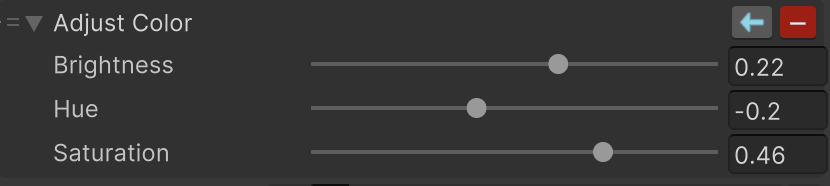
Changes a color's brightness, hue, and saturation.
The Adjust Color modifier
**Parameters:** adjust **Brightness**, **Hue**, and **Saturation**. Positive and negative values shift each setting in opposite directions.
{% hint style="info" %}
**Example:** lower Saturation for a disabled control, increase Brightness for a highlighted control, or shift Hue to create a warning state from the same base color.
{% endhint %}
Start with small changes. This keeps the original color recognizable and helps UI states remain consistent.
{% hint style="info" %}
In Binding System 2 before 2.8.0 the three settings were not saved with the scene. If a binding carried over from such a version has lost its values, set them again and save. See [Upgrading from Binding System 2](/binding-system-3/getting-started/upgrading.md).
{% endhint %}
***
## Color Additive
Adds another color to the incoming color.
The Color Additive modifier
**Parameters:** set **Additive** to the color to add to each channel.
{% hint style="info" %}
**Example:** adding a small blue color can make a neutral color feel cooler. Adding black leaves the color unchanged.
{% endhint %}
Use small additive values for subtle effects. Large values can make colors too bright or lose detail.
***
## Tint Color
Multiplies the incoming color by a tint color.
The Tint Color modifier
**Parameters:** set **Tint** to the color used to tint each channel.
{% hint style="info" %}
**Example:** a gray tint can dim a button, while a green tint can communicate a positive state without replacing the original color.
{% endhint %}
White leaves the color unchanged. A black channel removes that channel from the result.
***
## Set Alpha
Changes only the transparency of a color, leaving red, green, and blue untouched.
The Set Alpha modifier
**Parameters:** choose **Mode** and set **Alpha**. `Set` replaces the alpha with your value, `Multiply` scales the color's own alpha by it, and `Add` offsets the alpha by it.
{% hint style="info" %}
**Example:** `Multiply` with Alpha `0.5` makes any color half as opaque as it already was, so a fade stays relative to the original design. `Set` with Alpha `1` forces a color to be fully opaque no matter what it arrives as.
{% endhint %}
Use `Multiply` when a shared fade should respect the original transparency, and `Set` when the result must have one exact alpha. The value can be bound, so the transparency can follow a fade value or a distance.
Alpha is not clamped, which keeps the modifier reversible. Add [Clamp Value](/binding-system-3/pipeline/modifier-catalogue/numbers.md#clamp-value) ahead of it, or keep your values inside `0` to `1`, if a computed alpha could run outside that range.
{% hint style="warning" %}
In a two-way binding, `Multiply` and `Add` are undone exactly on the way back. `Set` cannot be undone, since the original alpha is gone, so the value passes through unchanged. Set the modifier to **Write** mode if alpha should be forced while writing instead.
{% endhint %}
***
## Blend Color
Combines the incoming color with another color using a blend mode and an amount.
The Blend Color modifier
**Parameters:** choose **Mode**, set **Color** to the color to blend with, and set **Amount** to how much of the blend is applied. `0` keeps the incoming color, `1` applies the mode fully.
| Mode | What it does |
| ---------- | ------------------------------------------------------------------------- |
| `Lerp` | Mixes the two colors directly, like a crossfade. |
| `Multiply` | Darkens, keeping the darker parts of both colors. |
| `Screen` | Lightens, keeping the lighter parts of both colors. |
| `Overlay` | Darkens the dark parts and lightens the light parts, increasing contrast. |
| `Additive` | Adds the blend color, which brightens. |
| `Subtract` | Removes the blend color, which darkens. |
{% hint style="info" %}
**Example:** `Lerp` toward red with Amount bound to a damage value fades a character's color to red as they take damage. `Multiply` with a gray color and Amount `1` dims a whole panel.
{% endhint %}
Only red, green, and blue are blended; transparency passes through untouched. Use [Set Alpha](#set-alpha) when transparency is what needs to change.
`Multiply` and `Additive` overlap with Tint Color and Color Additive on purpose. Those two are single-field modifiers for the common case; use Blend Color when the effect needs a mode, an amount, or both, especially with the amount bound so the blend can be dialled in while the game runs.
{% hint style="info" %}
Every mode is reversible, so a two-way binding round-trips. The exceptions are the extremes, where the blend erases the original color: `Multiply` against a black channel, or any mode at Amount `1` that fully replaces the input.
{% endhint %}
***
## Swizzle Color
Rearranges the red, green, blue, and alpha channels of a color.
The Swizzle Color modifier
**Parameters:** choose what supplies each output channel in **Swizzle**. Each of the four dropdowns offers the source channels `R`, `G`, `B`, and `A`, their inverses `1 - R`, `1 - G`, `1 - B`, and `1 - A`, and the constants `0` and `1`.
{% hint style="info" %}
**Example:** swap red and blue to change an `RGBA` color into `BGRA`, or copy alpha into the color channels to visualize a mask. Set the alpha slot to `1` to drop transparency, or use `1 - R` on every channel for an inverted color.
{% endhint %}
Use this when channels have a specific meaning. For ordinary color adjustments, Adjust Color or Tint Color is easier to understand.
{% hint style="info" %}
The write direction undoes the rearrangement whenever it can be undone, that is, when every channel is used exactly once. A swizzle that drops, duplicates, or replaces a channel cannot be undone, and the value passes through unchanged.
{% endhint %}
***
## Color Expression
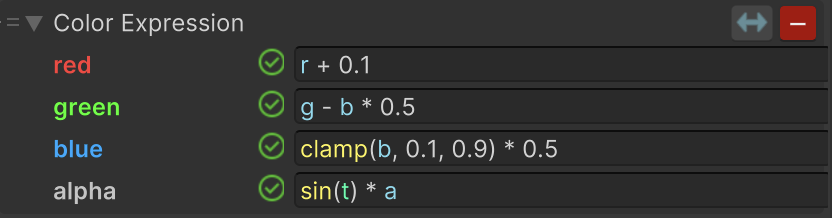
Lets you use a separate formula for each color channel.
The Color Expression modifier
**Parameters:** enter an expression for **Red**, **Green**, **Blue**, and **Alpha**. Use `r`, `g`, `b`, and `a` to refer to the matching incoming channels.
{% hint style="info" %}
**Example:** set the Red expression to `1 - r` and leave the other channels unchanged to create a custom partial inversion.
{% endhint %}
Use this for effects that cannot be made with Adjust Color, Color Additive, Tint Color, or Blend Color. Keep each channel formula simple and test transparent colors as well as opaque ones.
### Working with channels
Each channel has its own formula. In every formula, `r`, `g`, `b`, and `a` refer to the incoming red, green, blue, and alpha channels. The default formulas simply pass the color through: `r`, `g`, `b`, and `a`.
{% hint style="info" %}
**Step-by-step example:** set the Red formula to `1 - r`, and leave Green, Blue, and Alpha as `g`, `b`, and `a`. The result keeps the original green, blue, and transparency while inverting only red.
{% endhint %}
You can create additional float bindings in a channel formula just as you do in [Math Expression](/binding-system-3/pipeline/modifier-catalogue/numbers.md#math-expression). For example, enter `r * brightness`, press **Enter**, then bind the new **brightness** field to a day/night value.
Every channel field is a full expression field, so it also has the help panel with clickable function chips and the live preview described in [Math Expression](/binding-system-3/pipeline/modifier-catalogue/numbers.md#the-help-panel-and-the-live-preview).
{% hint style="warning" %}
Color Expression changes values travelling from the source to the target. It does not reverse its formulas when a two-way binding writes back to the source.
{% endhint %}
{% hint style="info" %}
To react to a color rather than change it, invoking an event when a specific color arrives, or driving a boolean while it does, see [Events and conditions](/binding-system-3/pipeline/modifier-catalogue/events-and-conditions.md).
{% endhint %}
## Related pages
* [Modifier Catalogue](/binding-system-3/pipeline/modifier-catalogue.md): every modifier, by value type.
* [TextMeshPro and Unity UI](/binding-system-3/reference/integrations/unity-ui.md): binding colours on UI components.