> For the complete documentation index, see [llms.txt](https://postica.gitbook.io/binding-system-3/llms.txt). Markdown versions of documentation pages are available by appending `.md` to page URLs; this page is available as [Markdown](https://postica.gitbook.io/binding-system-3/pipeline/modifier-catalogue/events-and-conditions.md).

# Events and conditions

Reacting to a value without changing it.

Two families of modifiers watch the value that travels through a binding and react to it, without changing it.

* **Value Events** delivers the value to other bindings, and to `UnityEvent` listeners, whenever it matches a rule you wrote.
* **Value Conditions** reports whether that same rule holds, as a true/false value, to boolean bindings and to `UnityEvent` listeners.

They are authored in exactly the same way, a list of rules, each with somewhere to deliver to, and both pass the incoming value along untouched. Adding one never changes what a binding already does; it only adds reactions to it.

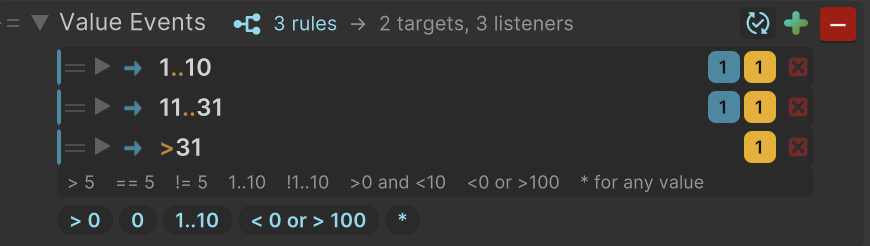
<figure><img src="https://3048705056-files.gitbook.io/~/files/v0/b/gitbook-x-prod.appspot.com/o/spaces%2FLUfBXR02sJ5i0MxwYbaV%2Fuploads%2Fgit-blob-1ef31340ad4f5277d2097c3f20539eb4dc22b953%2Fmodifier-value-events.png?alt=media" alt="" width="563"><figcaption><p>Value Events on a numeric binding, with three rules</p></figcaption></figure>

{% hint style="info" %}
Each rule has a direction of its own: **Read**, **Write**, or **Read Write**, which is the default. A rule reacts to a value travelling from the source toward the bound field, to one being pushed back into the source, or to both. The [bind mode](/binding-system-3/overview/modes-and-updates.md) of the binding itself still decides which directions ever happen, so a rule set to Write on a read-only binding never sees a value.
{% endhint %}

Rules only run while the game is playing. The inspector's [live preview](/binding-system-3/project-tools/diagnostics/path-value-preview.md) asks a binding what it would produce merely in order to show it, and no event is invoked from there: looking at an object never runs game logic.

***

## Value Events

Delivers the incoming value, unchanged, to other bindings and to event listeners when it matches one of your rules.

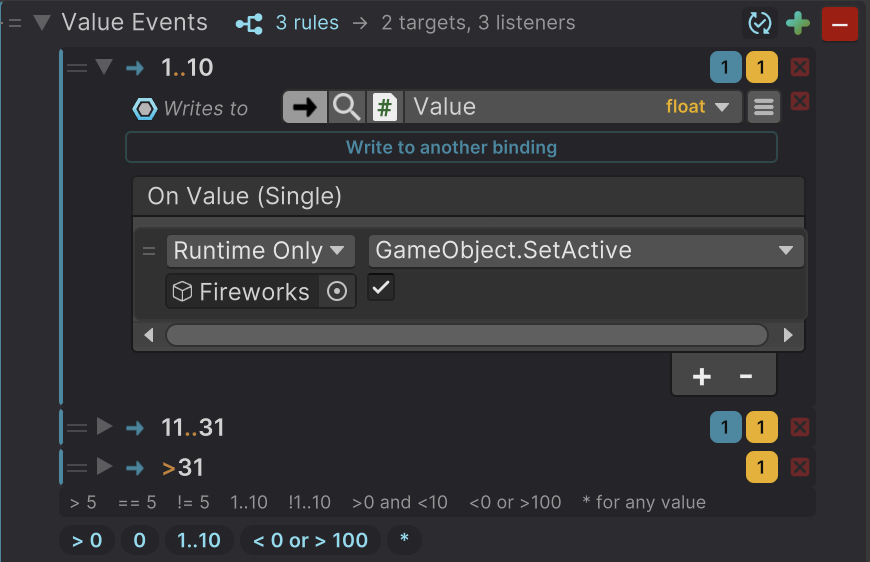
<figure><img src="https://3048705056-files.gitbook.io/~/files/v0/b/gitbook-x-prod.appspot.com/o/spaces%2FLUfBXR02sJ5i0MxwYbaV%2Fuploads%2Fgit-blob-aa699e8673f7fd3b0085c4e0241909656c039b27%2Fmodifier-value-events-rule.png?alt=media" alt="" width="563"><figcaption><p>One rule, opened to show where it delivers</p></figcaption></figure>

**Parameters:** add a rule with **+**, write what it matches on the left, then open the rule and add the bindings it writes to and the listeners it invokes. The header holds the option that decides how often rules are delivered.

{% hint style="info" %}
**Example:** on a binding that writes a game state into a manager, a rule matching `GameOver` invokes an event that shows the results screen and plays a sound, while a second rule matching `Playing` invokes the one that hides it again.
{% endhint %}

Everything a rule receives is the value that was written, with the same type as the binding: a rule on a `Color` binding hands out a `Color`, and its listeners take a `Color` argument.

{% hint style="info" %}
**Step-by-step example:** on a binding that writes the player's health, add Value Events and click the `< 0 or > 100` chip under the rules, then edit the condition to `< 25`. Open the rule and click **Write to another binding**, binding it to the low-health effect's intensity: it receives the health value itself. Add a listener that starts the heartbeat sound. While the player is below 25 health, both the effect and the sound follow every update.
{% endhint %}

A target receives the value with the binding's own type, so it is usually a field of that same type. When it is not, the target has its own converters, exactly like any other binding.

***

## Value Conditions

Reports whether a rule holds, as `true` or `false`, to boolean bindings and to event listeners. The incoming value passes through untouched, exactly as with Value Events.

<figure><img src="https://3048705056-files.gitbook.io/~/files/v0/b/gitbook-x-prod.appspot.com/o/spaces%2FLUfBXR02sJ5i0MxwYbaV%2Fuploads%2Fgit-blob-126c1283841a0d15e6eef5113a3d0a2b7c35696e%2Fmodifier-value-conditions.png?alt=media" alt="" width="563"><figcaption><p>Value Conditions on a speed binding</p></figcaption></figure>

**Parameters:** the same rule list as Value Events. Every rule delivers a true/false value instead of the incoming one, so its targets are boolean bindings and its listeners take a `bool`. The header carries one extra option, **F**, described in [Options in the header](#options-in-the-header).

{% hint style="info" %}
**Example:** on a binding that writes a car's speed, a rule reading `> 60` writes `true` into the speed-warning icon's active state while the car is speeding, and `false` again as soon as it slows down.
{% endhint %}

### When true and false are delivered

A rule delivers `true` the moment it starts holding, and `false` the moment it stops. In between, nothing is sent: a rule that keeps holding does not write the same `true` into its targets on every update.

That is what makes this family the right one for a state, an active object, an enabled button, an animator flag, because the target always holds a definite value, and only changes when the rule's answer actually changes.

{% hint style="info" %}
**Step-by-step example:** on a binding that writes the player's health, add Value Conditions and write `< 25` in the first rule. Open it and bind the low-health vignette's active state. Below 25 health the vignette turns on, above it turns off, and nothing is written while health merely changes inside one of those two bands.
{% endhint %}

A rule that stops holding while **F** is turned off sends nothing, but it still remembers that it stopped: the next time it holds again it delivers `true` a second time. This makes a rule with **F** off behave like a Value Events rule that fires on each match, rather than one that fires only once ever.

{% hint style="info" %}
Each rule keeps its own answer, so overlapping rules do not interfere: `> 60` and `> 100` on the same speed binding drive two different targets, and each flips at its own threshold.
{% endhint %}

***

## Writing the rules

### The rule list

<figure><img src="https://3048705056-files.gitbook.io/~/files/v0/b/gitbook-x-prod.appspot.com/o/spaces%2FLUfBXR02sJ5i0MxwYbaV%2Fuploads%2Fgit-blob-db567417a959595a1daebdb2852516c652a22c96%2Fmodifier-rule-list-header.png?alt=media" alt=""><figcaption><p>The header: summary, options, and the add button</p></figcaption></figure>

The modifier occupies a single row, with the rules folded away behind it.

* The header summarizes the whole list, how many rules it holds, and how many bindings and listeners they reach between them, followed by the options and the **+** button that adds a rule.
* Each rule is one line: a grip to drag it, what it matches, two badges counting the bindings and the listeners it reaches, and a button to remove it. A rule that reaches neither is dimmed, because it is authored but silent.
* Open a rule with its arrow to see and edit where it delivers.

The icon at the far left of the header is highlighted while a list has no rules at all, and becomes an error icon when one of its rules cannot be used. Hovering it explains what it is telling you.

For a boolean or an enum binding, **+** offers the possible values directly and marks the ones already used, so a complete list can be filled in without typing.

### Where a rule delivers

An open rule has two halves.

* **Writes to** is a list of bindings that receive the value. Add one with **Write to another binding**; each new one starts out unbound, and an unbound target simply keeps the value to itself.
* The event below it holds the persistent listeners, authored like any other `UnityEvent` in the inspector.

The bindings are always written before the event is invoked, so a listener always sees the targets already carrying the new value rather than the previous one.

{% hint style="info" %}
A rule with only bindings, only listeners, or both is equally valid. Use bindings when a value has to end up somewhere, and listeners when something has to happen.
{% endhint %}

### Order matters

Every rule whose matcher holds is delivered, in the order the rules appear, not only the first one that matches. Two rules matching the same value therefore drive two independent sets of targets and listeners, which is a feature rather than a mistake.

Drag a rule by its grip to move it. Put the specific cases first and a catch-all last, the same way you would order a list of conditions in code.

### Matching numbers

On a numeric binding the left-hand side of a rule is a condition rather than a single number, so thresholds and ranges can be written directly. The condition is shown as a highlighted preview; click it to edit it.

| Condition      | Holds for                                        |
| -------------- | ------------------------------------------------ |
| `> 5`, `>= 5`  | Values above 5, or 5 and above.                  |
| `< 5`, `<= 5`  | Values below 5, or 5 and below.                  |
| `== 5`, `!= 5` | Exactly 5, or anything but 5.                    |
| `5`            | Exactly 5. A lone number means `== 5`.           |
| `1..10`        | Anything from 1 to 10, both ends included.       |
| `!1..10`       | Everything outside that range.                   |
| `..10`, `1..`  | Open-ended ranges: 10 and below, 1 and above.    |
| `>0 and <10`   | Both conditions at once.                         |
| `<0 or >100`   | Either condition. `and` binds tighter than `or`. |
| `*`, or empty  | Every value. This is the catch-all rule.         |

A name in front of the operator is allowed and ignored, so `x > 5` and `speed > 5` read naturally. The words `and` and `or` can also be written as `&`, `&&`, `,` and `|`, `||`, and they are not case sensitive. Numbers may be negative, decimal, or written with an exponent, as in `1e-3`.

The chips under the rules, `> 0`, `0`, `1..10`, `< 0 or > 100` and `*`, add a rule with that condition already filled in.

{% hint style="info" %}
`==` and `!=` compare with a small tolerance, relative to the size of the value. Without it, a condition typed against a `float` binding would almost never match.
{% endhint %}

{% hint style="warning" %}
A condition that cannot be read is marked in the inspector, and its rule never delivers anything: a typo silently stops a rule instead of turning it into a catch-all. The Console also receives one warning per modifier, the first time the broken condition is reached while playing.
{% endhint %}

Available for `float`, `double`, `decimal`, `int`, `uint`, `long`, `ulong`, `short`, `ushort`, `byte` and `sbyte`. Numeric bindings have no exact-value variant, because `== 5` already covers it.

### Matching text

On a text binding the left-hand side is a pattern, and a dropdown in the header decides how the whole list reads its patterns.

<figure><img src="https://3048705056-files.gitbook.io/~/files/v0/b/gitbook-x-prod.appspot.com/o/spaces%2FLUfBXR02sJ5i0MxwYbaV%2Fuploads%2Fgit-blob-f8586b971f7955bdf1ff978b34953ea916ba3e91%2Fmodifier-text-patterns.png?alt=media" alt="" width="563"><figcaption><p>Text patterns in Wildcard mode</p></figcaption></figure>

| Mode         | Patterns are                                                                                                                         |
| ------------ | ------------------------------------------------------------------------------------------------------------------------------------ |
| **Wildcard** | Text with `*` for any run of characters, including none, and `?` for exactly one. A pattern without either is compared for equality. |
| **Exact**    | Compared for equality as they are; nothing in them is an operator.                                                                   |
| **Regex**    | .NET regular expressions, searched anywhere in the text unless anchored with `^` and `$`.                                            |

The **Aa** option next to the dropdown decides whether upper and lower case count as different characters, for the whole list. An empty pattern matches empty text, and text that was never set is treated as empty.

{% hint style="info" %}
**Example:** in Wildcard mode, `*.png` holds for any file name ending in `.png`, and `player_?` for `player_1` through `player_9`. A single `*` is the catch-all.
{% endhint %}

{% hint style="warning" %}
As with a broken condition, a regular expression that cannot be compiled is marked in the inspector, never matches, and is reported once to the Console.
{% endhint %}

### Matching any other value

Every other supported type matches an exact value, authored with the very field Unity would draw for it.

The `*` chip at the left of the rule turns it into a catch-all: it then holds for every written value, whatever it is, and the value field is replaced by "any value". For a boolean or an enum binding, **Any Value** is also offered directly in the **+** menu.

{% hint style="info" %}
**Example:** a catch-all rule at the end of a list is the "everything else" case. On a Value Conditions list it is also the way to say "any value at all arrived", which is a useful signal on its own.
{% endhint %}

Object references are compared as references, so a rule holds for one specific asset or instance rather than for an equal-looking one. As with the other object modifiers, the rule can be retargeted to a more specific type than the binding itself.

### Options in the header

| Option                   | Available on     | What it does                                                                                     |
| ------------------------ | ---------------- | ------------------------------------------------------------------------------------------------ |
| Update icon              | Both families    | On, the default: deliver only when something changes. Off: deliver on every single write.        |
| **F**                    | Value Conditions | On, the default: deliver `false` as soon as a rule stops holding. Off: only ever deliver `true`. |
| **Aa**                   | Text bindings    | Compare upper and lower case as different characters.                                            |
| Wildcard / Exact / Regex | Text bindings    | How the whole list reads its patterns.                                                           |

Leave the update option on unless every write really has to be delivered. A binding that is written every frame would otherwise fire its listeners every frame, which is rarely what a rule list is for. With it on, a repeated value is skipped altogether, and a Value Conditions rule only speaks up when its own answer changes.

***

## Which values have them

Both families are available for numbers, text, `bool`, `char`, `Vector2`, `Vector3`, `Vector4`, `Vector2Int`, `Vector3Int`, `Color`, and object references.

Your own types, enums, structs, and classes, get both families through the standard modifiers generator: mark the type with `[EnableStandardModifiers]`, or add it to the list in **Project Settings ▸ Binding Settings ▸ Standard Modifiers**. The generated versions match an exact value, with the same `*` catch-all as the built-in ones. See [Standard Modifiers for Your Types](/binding-system-3/pipeline/standard-modifiers.md).

***

## Performance and behaviour notes

* A rule list is walked from top to bottom on every delivered write. These lists hold a handful of rules and are compared in place, so no memory is allocated while the game runs, and there is nothing to warm up.
* Conditions and patterns are read once and remembered, and read again only when you edit them.
* Turning the update option off is what makes the modifier run on every write, so it costs more than the default. Turn it off deliberately.
* A rule with no targets and no listeners costs a comparison and nothing else, so an unfinished list is harmless.
* Neither family changes the value, which means neither has anything to undo when a two-way binding writes back.

## Related pages

* [Modifier Catalogue](/binding-system-3/pipeline/modifier-catalogue.md): every modifier, by value type.
* [Standard Modifiers for Your Types](/binding-system-3/pipeline/standard-modifiers.md): both families, for a type of your own.
* [Bind Modes and Update Points](/binding-system-3/overview/modes-and-updates.md): which direction a binding actually travels in.