> For the complete documentation index, see [llms.txt](https://postica.gitbook.io/binding-system-3/llms.txt). Markdown versions of documentation pages are available by appending `.md` to page URLs; this page is available as [Markdown](https://postica.gitbook.io/binding-system-3/pipeline/modifier-catalogue/text.md).

# Text

Modifiers that build and reshape text.

## Text Template

Builds a piece of text from a template, where the incoming value and any number of other values act as placeholders. This is the modifier to reach for whenever text has to be assembled, and it replaces both [String Format](#string-format-deprecated) and [String Concat](#string-concat-deprecated).

<figure><img src="https://3048705056-files.gitbook.io/~/files/v0/b/gitbook-x-prod.appspot.com/o/spaces%2FLUfBXR02sJ5i0MxwYbaV%2Fuploads%2Fgit-blob-372d199b0157a663be5cf2df489e609676b3d077%2Fmodifier-text-template.png?alt=media" alt="" width="563"><figcaption><p>The Text Template modifier</p></figcaption></figure>

**Parameters:** write the text in **Template**. Use `{x}` where the incoming value should appear, and any other name in braces to create a bindable variable. Add transforms to a placeholder with `|`, as in `{x|upper}`.

{% hint style="info" %}
**Example:** the template `Score: {x|padLeft:6,0}` turns an incoming `250` into `Score: 000250`. The template `{x|truncate:12}` shortens a long item name and marks that it was cut.
{% endhint %}

### Writing a template

A template is ordinary text with `{placeholder}` tokens in it. Everything outside the braces is used exactly as you typed it.

* `{x}` is the incoming value. `{input}` means the same thing.
* Any other name, such as `{playerName}`, creates a bindable text field below the template. As with [Math Expression](/binding-system-3/pipeline/modifier-catalogue/numbers.md#math-expression), you do not create the field separately: type the name in the template, then press **Enter** or click outside the field, and the variable appears.
* `{{` and `}}` produce a literal `{` and `}` in the result.

Variables hold text, and a bound value is converted to text on its way in, so a variable can be bound to a number, an enum, or anything else that is not a string to begin with.

{% hint style="info" %}
**Step-by-step example:** enter `{label}: {x} / {max}` and press **Enter**. The inspector adds **label** and **max** fields. Type `Ammo` into label, bind max to the magazine size, and let the binding itself carry the current ammo count. The result reads `Ammo: 7 / 30` and updates whenever either value changes.
{% endhint %}

### Transforms

A placeholder can carry transforms, written after a `|` and applied from left to right. `{x|trim|upper}` trims the value and then uppercases it. Some transforms take a value after a `:`.

| Transform   | Argument             | What it does                                                                                                                                      |
| ----------- | -------------------- | ------------------------------------------------------------------------------------------------------------------------------------------------- |
| `upper`     | none                 | Uppercases the value. `uc` reads the same.                                                                                                        |
| `lower`     | none                 | Lowercases the value. `lc` reads the same.                                                                                                        |
| `title`     | none                 | Uppercases the first letter of every word.                                                                                                        |
| `trim`      | characters, optional | Removes whitespace, or the given characters, from both ends.                                                                                      |
| `trimStart` | characters, optional | Removes whitespace, or the given characters, from the start.                                                                                      |
| `trimEnd`   | characters, optional | Removes whitespace, or the given characters, from the end.                                                                                        |
| `padLeft`   | `N`, or `N,c`        | Right-aligns the value in a field of N characters, padding with spaces or with the character `c`. `pad` reads the same.                           |
| `padRight`  | `N`, or `N,c`        | Left-aligns the value in a field of N characters.                                                                                                 |
| `truncate`  | `N`, or `N,text`     | Shortens the value to N characters, ending with `…`, or with your own text. Write `N,` for a hard cut with nothing added. `trunc` reads the same. |
| `default`   | text                 | Replaces an empty value with the given text. `fallback` reads the same.                                                                           |
| `bold`      | none                 | Wraps the value in a rich-text bold tag. `b` reads the same.                                                                                      |
| `italic`    | none                 | Wraps the value in a rich-text italic tag. `i` reads the same.                                                                                    |
| `color`     | color                | Wraps the value in a rich-text color tag. Takes `#RGB`, `#RGBA`, `#RRGGBB`, `#RRGGBBAA`, or a color name such as `orange`. `c` reads the same.    |
| `size`      | size                 | Wraps the value in a rich-text size tag. Takes `N`, `+N`, `-N`, or `N%`.                                                                          |

{% hint style="info" %}
**Example:** `{x|default:Unknown|title}` shows `Unknown` when the value is empty and title-cases it otherwise. `{x|truncate:20}` keeps a label short. `{x|color:#ffcc00|bold}` highlights a value inside a rich-text label.
{% endhint %}

The rich-text transforms, `bold`, `italic`, `color`, and `size`, only appear as formatting in a text component that has rich text enabled. Elsewhere the tags show up as literal text.

The accepted color names are `aqua`, `black`, `blue`, `brown`, `cyan`, `darkblue`, `fuchsia`, `green`, `grey`, `gray`, `lightblue`, `lime`, `magenta`, `maroon`, `navy`, `olive`, `orange`, `purple`, `red`, `silver`, `teal`, `white`, and `yellow`.

### The transform chips, help panel, and live preview

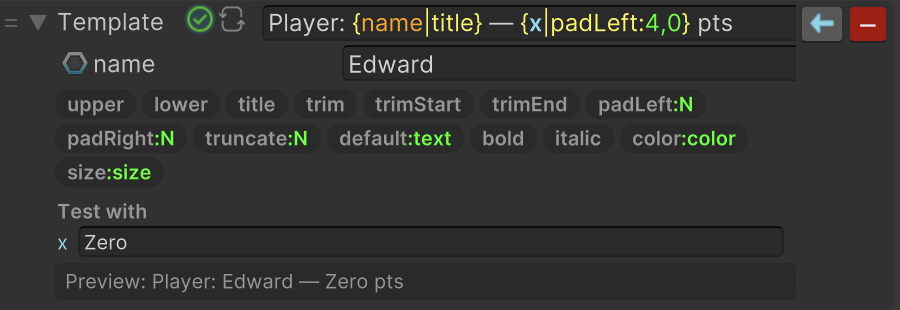
Click the icon at the left of the template field to open a panel below it. The panel lists every transform as a clickable chip. Clicking a chip adds that transform to the placeholder the caret currently sits in, or appends an `{x}` placeholder first, if the caret is not inside one. A chip written as `name:value` needs a value, and lands with a sample value already filled in and selected, so it can be typed straight over.

<figure><img src="https://3048705056-files.gitbook.io/~/files/v0/b/gitbook-x-prod.appspot.com/o/spaces%2FLUfBXR02sJ5i0MxwYbaV%2Fuploads%2Fgit-blob-bca2cf7de7f6438d6d9bd5368df9aaa47774ae57%2Fmodifier-text-template-help.png?alt=media" alt="" width="563"><figcaption><p>Text Template with the help panel open</p></figcaption></figure>

The panel also shows a live **Preview** of the finished text, plus a **Test with** field that stands in for the bound value while you edit. Nothing typed there is saved into the binding: it only exists in the inspector.

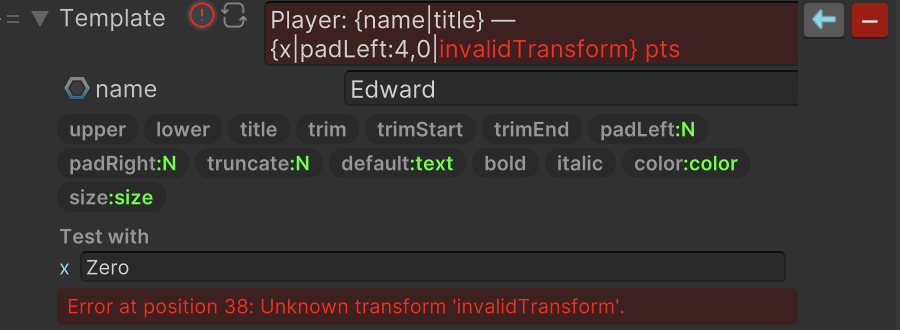
When the template cannot be parsed, the row is flagged as an error, the template text turns red from the point where the problem starts, and the preview shows the message explaining it.

<figure><img src="https://3048705056-files.gitbook.io/~/files/v0/b/gitbook-x-prod.appspot.com/o/spaces%2FLUfBXR02sJ5i0MxwYbaV%2Fuploads%2Fgit-blob-11bc39ef66ab912f6ec8c10a2b3e7d74f607d53f%2Fmodifier-text-template-error.png?alt=media" alt="" width="563"><figcaption><p>Text Template reporting an error</p></figcaption></figure>

An indicator on the row tells you whether the template can be reversed, and its tooltip spells out what a two-way binding will do.

{% hint style="warning" %}
Only a plain template, a prefix, `{x}`, and a suffix, with no transforms and no other variables, can be reversed. In that case a value written back to the source has the surrounding text stripped off again. Any other template loses information, so the value passes through unchanged on the way back. Set the modifier to **Write** mode if the template should be applied while writing instead.
{% endhint %}

A template with no bound variables is rebuilt only when the incoming value changes, so a static template costs almost nothing. Binding a variable means the text is rebuilt on every update.

{% hint style="info" %}
An invalid template never interrupts the binding: while the template cannot be parsed, the incoming value simply passes through unchanged.
{% endhint %}

***

## Change Casing

Changes text to uppercase or lowercase.

<figure><img src="https://3048705056-files.gitbook.io/~/files/v0/b/gitbook-x-prod.appspot.com/o/spaces%2FLUfBXR02sJ5i0MxwYbaV%2Fuploads%2Fgit-blob-af2b3ee7ea1993527d36991c53d1ce31968b5a8f%2Fmodifier-change-casing.png?alt=media" alt="" width="563"><figcaption><p>The Change Casing modifier</p></figcaption></figure>

**Parameters:** choose **Casing**: lowercase, lowercase using invariant rules, uppercase, or uppercase using invariant rules.

{% hint style="info" %}
**Example:** `Play Now` becomes `PLAY NOW` when using uppercase. This is useful for labels that must follow a visual style.
{% endhint %}

Use the invariant options for identifiers, save keys, or other text that must look the same in every language. Keep the normal options for player-facing localized text.

{% hint style="info" %}
In Binding System 2 before 2.8.0 the chosen casing was not saved with the scene. If a binding carried over from such a version shows the wrong casing, pick the option again and save. See [Upgrading from Binding System 2](/binding-system-3/getting-started/upgrading.md).
{% endhint %}

***

## Substring

Uses only part of a text value.

<figure><img src="https://3048705056-files.gitbook.io/~/files/v0/b/gitbook-x-prod.appspot.com/o/spaces%2FLUfBXR02sJ5i0MxwYbaV%2Fuploads%2Fgit-blob-cbab0a2e2da7480b6e43872ce1fc085ef1a7201e%2Fmodifier-substring.png?alt=media" alt="" width="563"><figcaption><p>The Substring modifier</p></figcaption></figure>

**Parameters:** set **Start Index** to the character where the result starts. Set **Length** to the number of characters to keep; `0` keeps everything from Start Index to the end. A negative Start Index counts backward from the end.

{% hint style="info" %}
**Example:** Start Index `0` and Length `3` turns `Binding System` into `Bin`. Start Index `-6` and Length `0` returns `System`.
{% endhint %}

Use this for previews and short labels. Make sure the text can be long enough for the requested starting position.

To shorten a label for display, `{x|truncate:N}` in a Text Template is usually the better fit, because it also marks that something was cut off.

***

## Deprecated

The two modifiers below are deprecated in favour of [Text Template](#text-template).

They can no longer be added, so they no longer appear in the Bind Menu. Bindings that already use them keep working exactly as before: the data still loads and the modifier still runs. In the inspector such a row is marked as deprecated and offers an **UPGRADE** button that converts it into an equivalent Text Template in place. The conversion is undoable, and it is available when a single object is selected, not across a multi-selection.

<figure><img src="https://3048705056-files.gitbook.io/~/files/v0/b/gitbook-x-prod.appspot.com/o/spaces%2FLUfBXR02sJ5i0MxwYbaV%2Fuploads%2Fgit-blob-4319815259f35214f9124cabc78810e64fdc2d8f%2Fmodifier-deprecated-upgrade.png?alt=media" alt="" width="563"><figcaption><p>The upgrade option on a deprecated modifier</p></figcaption></figure>

### String Format (deprecated)

Places the incoming text inside a format that you provide.

<figure><img src="https://3048705056-files.gitbook.io/~/files/v0/b/gitbook-x-prod.appspot.com/o/spaces%2FLUfBXR02sJ5i0MxwYbaV%2Fuploads%2Fgit-blob-21d37c3e32fc6c60ba7b7986fcbfd17b3934366a%2Fmodifier-string-format.png?alt=media" alt="" width="563"><figcaption><p>The String Format modifier</p></figcaption></figure>

**Parameters:** set **Format** and use `{0}` where the incoming value should appear.

{% hint style="info" %}
**Example:** `Score: {0}` turns `250` into `Score: 250`. `[{0}]` turns `Online` into `[Online]`.
{% endhint %}

**Upgrading:** the **UPGRADE** button rewrites the format as a template, turning each `{0}` into `{x}`. An alignment such as `{0,8}` becomes a `padLeft` transform, and `{0,-8}` becomes `padRight`. A format specifier such as `{0:F1}` is dropped, and you are told so before the data is rewritten: it never had any effect here, because the value reaching this modifier is already text.

The button is unavailable when **Format** is bound to another value, because a template's text is authored rather than bound; unbind it first. It is also unavailable when the format is malformed, or when it refers to an argument other than `{0}`, since only one value is ever passed and such a format already fails at runtime.

### String Concat (deprecated)

Builds text from several pieces and inserts the incoming value at the position you choose.

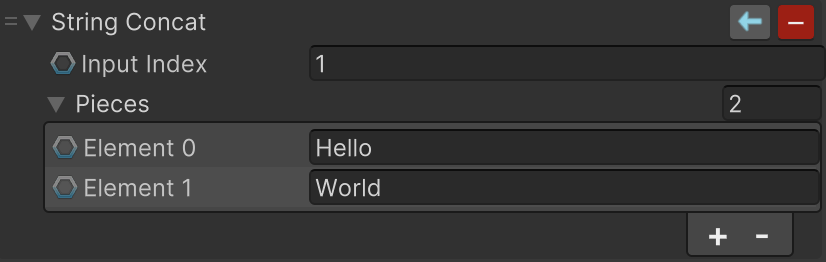
<figure><img src="https://3048705056-files.gitbook.io/~/files/v0/b/gitbook-x-prod.appspot.com/o/spaces%2FLUfBXR02sJ5i0MxwYbaV%2Fuploads%2Fgit-blob-48a3b8062001e3eead90755ca85aa91bfa965deb%2Fmodifier-string-concat.png?alt=media" alt="" width="563"><figcaption><p>The String Concat modifier</p></figcaption></figure>

**Parameters:** add text or bound values to **Pieces**, then set **Input Index** to the position where the incoming text is inserted.

{% hint style="info" %}
**Example:** Pieces `Player:` and `/ Ready`, with Input Index `1`, turns the incoming name `Alex` into `Player: Alex / Ready`.
{% endhint %}

The incoming text is inserted *before* the piece at **Input Index**. If Input Index is beyond the last piece, the incoming text is appended at the end. Each piece can be fixed text or its own binding.

**Upgrading:** the **UPGRADE** button builds a template from the pieces in order, with `{x}` at the insertion point. Fixed pieces become literal text, and each bound piece becomes a bindable variable named after its position, such as `{p0}`, keeping the binding it already had.

The button is unavailable when **Input Index** is bound to another value, because the insertion point cannot be expressed as a template; unbind it first.

{% hint style="info" %}
Need to react to a piece of text rather than change it? [Value Events](/binding-system-3/pipeline/modifier-catalogue/events-and-conditions.md#value-events) and [Value Conditions](/binding-system-3/pipeline/modifier-catalogue/events-and-conditions.md#value-conditions) match the incoming text against wildcards, exact values, or regular expressions, and deliver the text, or whether it matched, to other bindings and to `UnityEvent` listeners.
{% endhint %}

## Related pages

* [Modifier Catalogue](/binding-system-3/pipeline/modifier-catalogue.md): every modifier, by value type.
* [TextMeshPro and Unity UI](/binding-system-3/reference/integrations/unity-ui.md): where most of this text ends up.