> For the complete documentation index, see [llms.txt](https://postica.gitbook.io/binding-system-3/llms.txt). Markdown versions of documentation pages are available by appending `.md` to page URLs; this page is available as [Markdown](https://postica.gitbook.io/binding-system-3/reference/integrations/vscode-and-rider.md).

# VS Code and Rider

See in your code which classes and members your bindings use.

A binding names the members it reads and writes as text, inside a scene, a prefab or an asset. That is what lets a designer rewire a project without a programmer, and it is also why your IDE's **Find Usages** cannot see it: as far as the code knows, nothing reads `Health.current`, and renaming it looks perfectly safe.

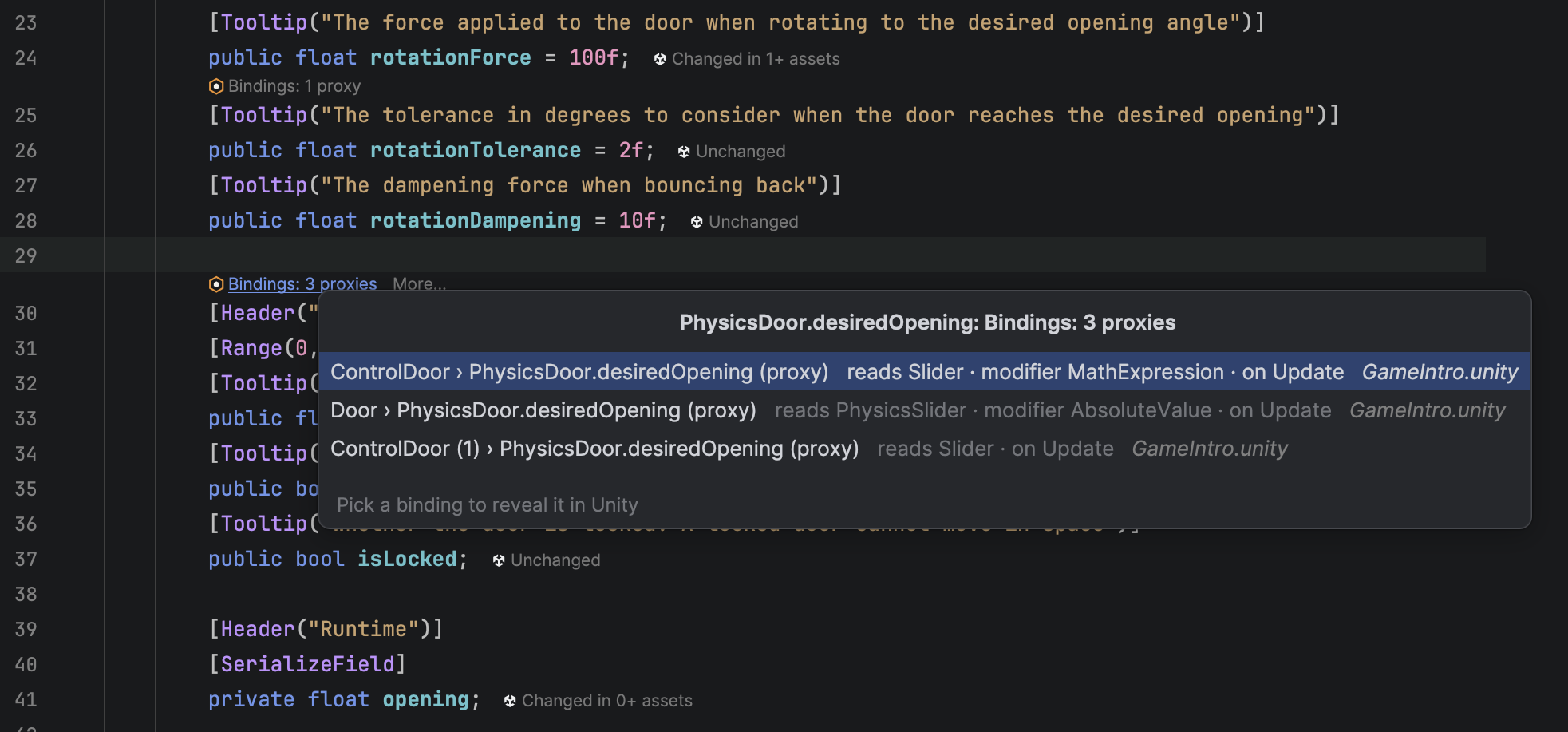
The Binding System extensions for VS Code and Rider put that knowledge back where you read code. Above each class and member of your project, a line says how many bindings use it. Click it to list them, pick one, and Unity selects the object that holds it.

<figure><img src="https://3048705056-files.gitbook.io/~/files/v0/b/gitbook-x-prod.appspot.com/o/spaces%2FLUfBXR02sJ5i0MxwYbaV%2Fuploads%2Fgit-blob-c270b9b08c2c34206d00d8102907bbb7d34dd561%2Fplaceholder-ide-lenses.png?alt=media" alt=""><figcaption><p>Lenses in VS Code: above a class, above a field bindings read, and above a <code>Bind&#x3C;T></code> field</p></figcaption></figure>

## Setup

Usually none. A few seconds after Unity starts, the package installs the extension in the editor Unity opens scripts with (**Preferences ▸ External Tools ▸ External Script Editor**), or updates it when the package brings a newer one. A line in the Console says so. VS Code picks it up at its next window reload, Rider at its next start.

<table><thead><tr><th width="230">Editor</th><th>Supported</th></tr></thead><tbody><tr><td><strong>VS Code</strong></td><td>1.85 or newer, and the editors built on it: Cursor, VSCodium, Windsurf.</td></tr><tr><td><strong>Rider</strong></td><td>2025.1 or newer.</td></tr><tr><td><strong>Visual Studio</strong></td><td>Not supported. Its CodeLens does not attach to fields, which is where most bindings live, so an extension there would show the least useful half of this.</td></tr></tbody></table>

Each version is offered once per editor. An extension you uninstall stays uninstalled until a newer one ships, and a Rider plugin you switch off in Rider is never touched.

To install by hand, or into an editor Unity does not open scripts with, use the buttons in **Project Settings ▸ Binding System ▸ Configuration ▸ IDE Integration**. The built extensions are also in the package's `IDE~/dist` folder, for installing from the IDE itself: `code --install-extension` takes the `.vsix`, and Rider's **Settings ▸ Plugins ▸** gear menu **▸ Install Plugin from Disk** takes the `.zip`.

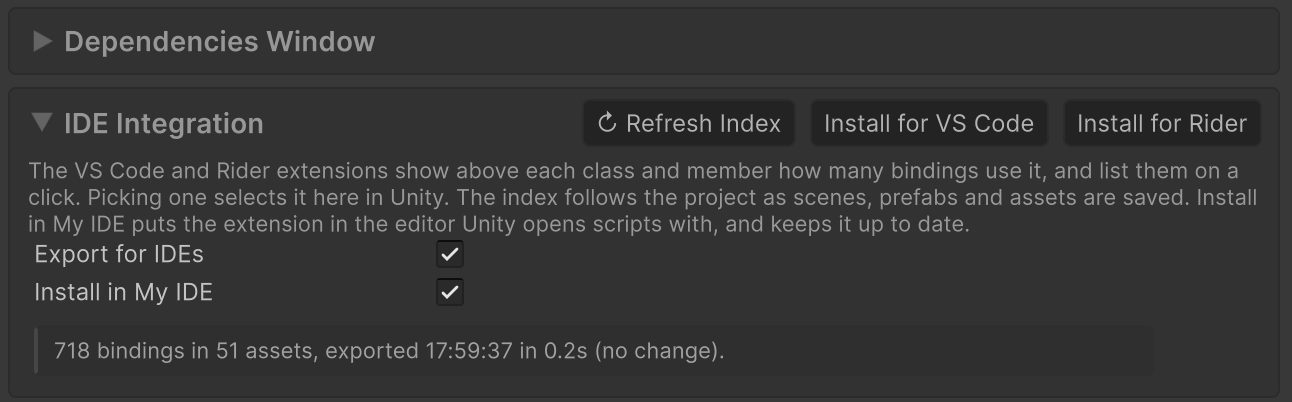
<figure><img src="https://3048705056-files.gitbook.io/~/files/v0/b/gitbook-x-prod.appspot.com/o/spaces%2FLUfBXR02sJ5i0MxwYbaV%2Fuploads%2Fgit-blob-9fd93bf3eec2ced1a8276c6b631b6b568f24eb69%2Fplaceholder-ide-settings.png?alt=media" alt=""><figcaption><p>The IDE Integration panel in Project Settings</p></figcaption></figure>

<table><thead><tr><th width="230">Control</th><th>What it does</th></tr></thead><tbody><tr><td><strong>Export for IDEs</strong></td><td>Keeps the index the extensions read up to date. On by default. Off, the index is deleted and the lenses disappear until it is switched on again.</td></tr><tr><td><strong>Install in My IDE</strong></td><td>The automatic install described above. Kept for this computer rather than in the project, so switching it off does not switch it off for your team.</td></tr><tr><td><strong>Install for VS Code</strong></td><td>Installs the extension in VS Code, or in the VS Code based editor Unity opens scripts with.</td></tr><tr><td><strong>Install for Rider</strong></td><td>Installs the plugin in the Rider Unity opens scripts with, or else in every Rider 2025.1 or newer that has run on this computer.</td></tr><tr><td><strong>↻ Refresh Index</strong></td><td>Reads every scene, prefab and asset again and rewrites the index. The same as <strong>Window ▸ Binding System ▸ Refresh IDE Index</strong>.</td></tr></tbody></table>

The line under the switches says how the last export went, for example *718 bindings in 42 assets, exported 10:14:03 in 1.2s*, or why it failed.

## What the lenses say

<table><thead><tr><th width="230">Above</th><th>Example</th><th>What it counts</th></tr></thead><tbody><tr><td>A class</td><td><code>Bindings: 2 as source, 5 as target</code></td><td><strong>As source</strong>: bindings that read or write an object of this type. <strong>As target</strong>: bindings that drive one of its fields, whether a <code>Bind&#x3C;T></code> field or a proxy binding on it.</td></tr><tr><td>A field, property or method</td><td><code>Bindings: 3 read, 1 write, 2 pass through</code></td><td><strong>Read</strong> and <strong>write</strong>: bindings whose path ends here. <strong>Pass through</strong>: bindings whose path goes through it to a deeper member, as <code>stats.health</code> passes through <code>stats</code>. <strong>Proxy</strong>: <a href="/binding-system-3/overview/proxy-bindings.md">proxy bindings</a> driving this field. <strong>UI</strong>: <a href="/binding-system-3/overview/ui-toolkit.md">UI Document bindings</a> driving it.</td></tr><tr><td>A <code>Bind&#x3C;T></code> field</td><td><code>Bound in 3 of 4 objects: reads PedalInput.value on "Pedals" · modifier Clamp</code></td><td>How many objects hold the field and how many of them have it bound, then what the binding most of them share does. <code>+1 other source</code> and <code>1 without a source</code> count the rest.</td></tr><tr><td>A <code>Bind&#x3C;T></code> field no saved object holds</td><td><code>Not in any saved scene or asset</code></td><td>The field exists in code but nothing is bound through it yet. This one can be switched off.</td></tr></tbody></table>

A lens's tooltip spells the count out and lists the first few bindings by name.

The source part follows the binding's [source mode](/binding-system-3/overview/sources.md), so a binding that finds its object at runtime says how it finds it rather than guessing what it will find: `reads Health.current of variable "Boss"`, `on #Player`, `found in the scene`.

## From a lens to the binding

Click a lens and the bindings it counts are listed, each with the object that holds it and the asset it is in. Typing filters the list.

Pick one and Unity comes to the front with that object selected and the Inspector scrolled to the binding. A scene that is not open is opened next to the ones that are, so nothing unsaved is lost. Unity has to be running with the project open; if it is not, the extension says so and does nothing. If the binding has moved since the index was written, Unity says so in the Console and refreshes the index.

In VS Code, the button at the end of an item opens the member the binding reads from instead.

**Binding System: Show Bindings of Symbol** in VS Code's command palette lists the bindings of the declaration under the cursor, for when you would rather not reach for the mouse.

## Settings in the IDE

<table><thead><tr><th width="230">Editor</th><th>Where</th><th>What there is</th></tr></thead><tbody><tr><td><strong>VS Code</strong></td><td><strong>Settings ▸ Extensions ▸ Binding System</strong></td><td>Show the lenses at all, show the lens on <code>Bind&#x3C;T></code> fields no saved object holds, and bring Unity to the front after asking it to reveal a binding.</td></tr><tr><td><strong>Rider</strong></td><td><strong>Settings ▸ Tools ▸ Binding System</strong></td><td>The last two of those. The lenses themselves are switched on, off or moved where Rider keeps every lens: <strong>Editor ▸ Inlay Hints ▸ Code Vision</strong>.</td></tr></tbody></table>

Both editors have a **Refresh Bindings Index** command (in Rider under **Tools**), which reads the index again and asks Unity to write a new one.

## How it stays current

Everything that takes knowledge of your project happens in Unity. Whenever a scene, prefab or asset is saved, and shortly after each script reload, the package reads the bindings out of the saved files on a background thread, without opening any of them, and writes `Library/BindingSystem/IdeIndex.json`. The file is rewritten only when what it says has changed, since every write makes the IDE reload it. The extensions only find the declarations in your code and look each one up in that file.

That split means the two extensions cannot disagree about a count or a word: they show what Unity wrote.

## Limits worth knowing

* **The index is the saved project.** A binding made in Unity shows once its scene or prefab is saved.
* **A prefab's binding is counted once**, in the prefab, however many instances of it there are. An override of a binding on one instance is not read.
* **A path through a provider is counted up to the provider.** UI Toolkit elements, Input Actions and [State](/binding-system-3/overview/state.md) members are made up by the provider at runtime rather than declared in your code, so there is no declaration to put a lens on.
* **Both branches of an `#if` are read.** A declaration repeated in both branches gets its lens twice.
* Like every project-wide tool of the package, the index reads the saved files as text, so **Project Settings ▸ Editor ▸ Asset Serialization** has to be **Force Text**.

## Troubleshooting

<table><thead><tr><th width="330">Symptom</th><th>What to do</th></tr></thead><tbody><tr><td>No lenses at all</td><td>Check the extension is installed and enabled, and that VS Code was reloaded or Rider restarted since. Then check that <code>Library/BindingSystem/IdeIndex.json</code> exists in the project: if it does not, turn on <strong>Export for IDEs</strong> and press <strong>↻ Refresh Index</strong>.</td></tr><tr><td>A binding you just made is not counted</td><td>Save its scene or prefab. The index is the saved project.</td></tr><tr><td>Picking a binding does nothing</td><td>Unity has to be running with the same project open. The extension says so when it is not.</td></tr><tr><td>The IDE says the index is written in another schema</td><td>The package and the extension are from different releases. Let Unity install the extension again with <strong>Install for VS Code</strong> or <strong>Install for Rider</strong>.</td></tr><tr><td>Rider shows no lenses after installing</td><td>Rider loads a plugin when it starts. Restart it, and check <strong>Editor ▸ Inlay Hints ▸ Code Vision</strong> has the Binding System lenses switched on.</td></tr></tbody></table>

## Related pages

* [Surviving a Rename](/binding-system-3/tutorials/surviving-a-rename.md): what to do when a rename has already broken bindings. The lenses are how you see it coming.
* [Bindings Dependencies](/binding-system-3/project-tools/diagnostics/dependencies.md): the same question, asked from Unity rather than from your code.
* [Bindings Validator](/binding-system-3/project-tools/diagnostics/validator.md): what finds the bindings that no longer resolve.