> For the complete documentation index, see [llms.txt](https://postica.gitbook.io/binding-system-3/llms.txt). Markdown versions of documentation pages are available by appending `.md` to page URLs; this page is available as [Markdown](https://postica.gitbook.io/binding-system-3/getting-started/concepts.md).

# Core Concepts

Four moving parts, and how they fit together.

There are four moving parts: a bind field, a source with a path to walk, a pipeline between them, and a mode that says which way the value goes. Learn those and the rest of this documentation is detail.

Before any of them, though, one choice.

## Two ways to bind

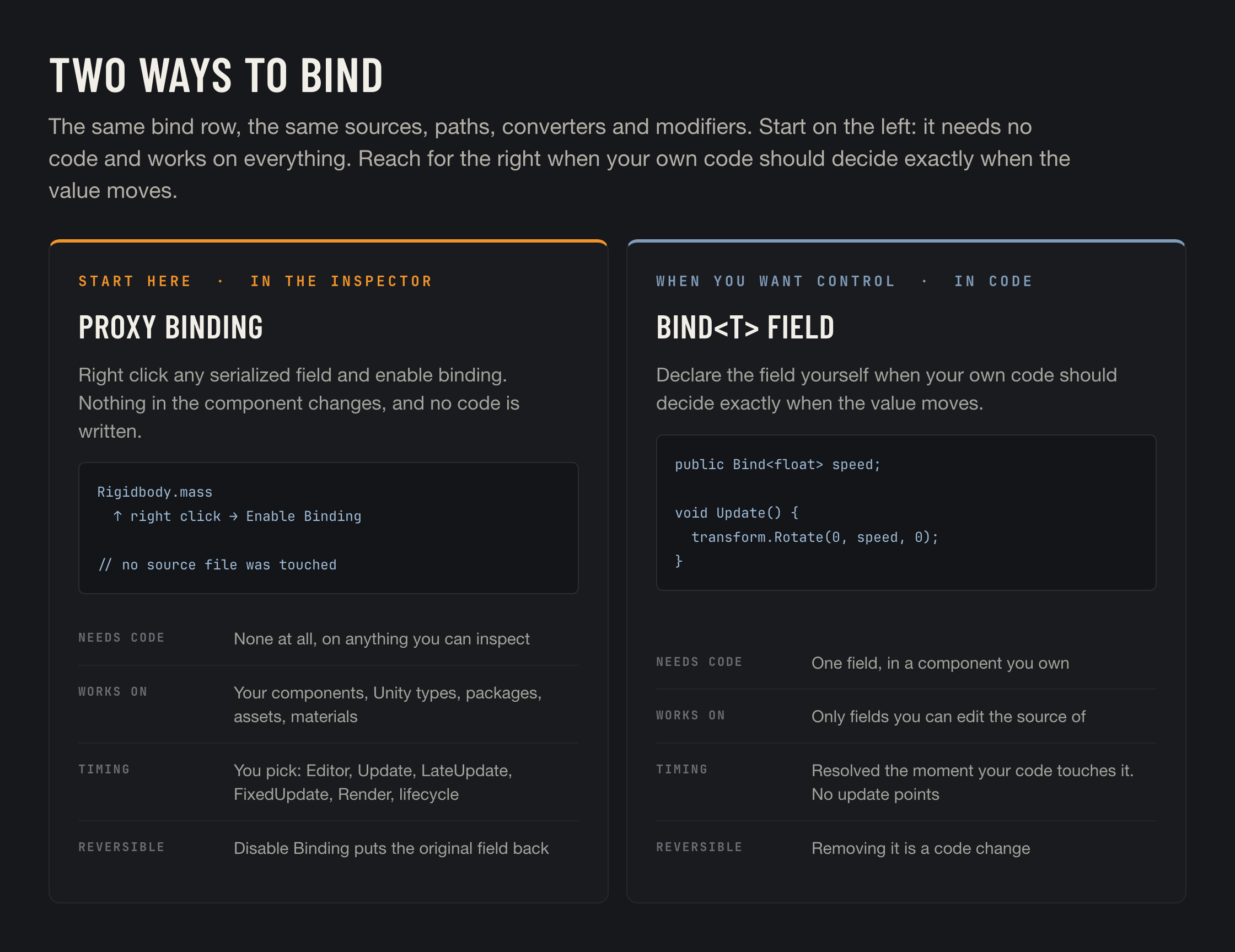
There are two ways to make a connection, and they answer to different people.

<figure><img src="https://3048705056-files.gitbook.io/~/files/v0/b/gitbook-x-prod.appspot.com/o/spaces%2FLUfBXR02sJ5i0MxwYbaV%2Fuploads%2Fgit-blob-a5117d86722c7c696df8ff1f790392ce280bcff7%2Ftwo-ways-to-bind.png?alt=media" alt="Bind<T> fields versus proxy bindings"><figcaption></figcaption></figure>

<table><thead><tr><th width="270">Way</th><th>What it gives you</th></tr></thead><tbody><tr><td><strong>A proxy binding, from the Inspector</strong><br><em>right click ▸ Enable Binding ▸ click the hexagon</em><br><strong>Start here.</strong></td><td>No code at all, on any serialized field of any component or asset, including Unity's own and anything from a package. Reversible in one click. The engine moves the value at an <a href="/binding-system-3/overview/modes-and-updates.md">update point</a> you choose, edit time included.</td></tr><tr><td><strong>A bind field, in code</strong><br><code>public Bind&#x3C;float> speed;</code></td><td>You change one field's type, then author the connection in the Inspector. Your code reading the field <em>is</em> the update, which makes it the cheapest and the most precise of the two. It needs the field to be yours.</td></tr></tbody></table>

They coexist freely and share everything downstream. [Two Ways to Bind](/binding-system-3/overview/two-ways-to-bind.md) is the page that compares them properly, and it is worth reading before you commit to a style.

## The bind field

A **bind field** is a serialized field whose type carries binding information alongside its value. In the common case that is `Bind<T>`:

```csharp
public Bind<float> speed;
```

It serializes three things: the value you typed, a flag saying whether the field is bound, and the bind data. Unbound, it is a `float` with extra bytes. Bound, the value is ignored and the bind data takes over.

The field is **opt in**, per instance. The same component can be unbound in one scene and bound in another, and the code never knows the difference.

Variants exist for read-only, write-only and lightweight cases. See [Bind Types](/binding-system-3/overview/bind-types.md).

## The source and the path

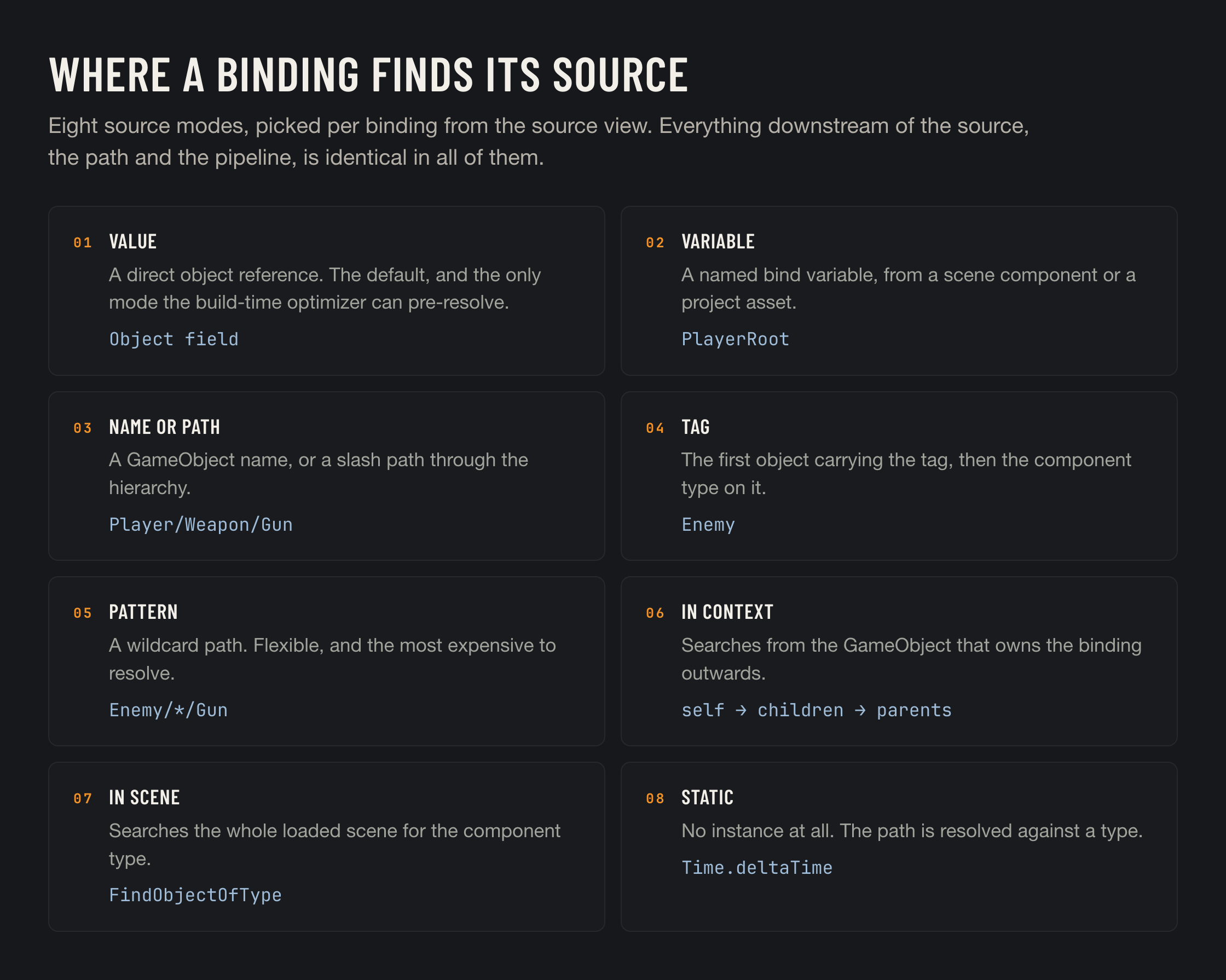
A binding needs to know **which object** and **which member of it**.

<figure><img src="https://3048705056-files.gitbook.io/~/files/v0/b/gitbook-x-prod.appspot.com/o/spaces%2FLUfBXR02sJ5i0MxwYbaV%2Fuploads%2Fgit-blob-055c91d99a8e6d20ac01b9cc11d87aabe881d954%2Fsource-modes.png?alt=media" alt="Eight source modes"><figcaption></figcaption></figure>

The **source** is usually a direct object reference, but it does not have to be. It can be a named variable, a GameObject name, a tag, a hierarchy pattern, a search from the owning object outwards, a search of the whole scene, or nothing at all when the member is static. See [Sources](/binding-system-3/overview/sources.md).

The **path** is a dotted route from the source to a value:

```
position.x
material.color.r
sharedMesh.bounds.size.magnitude
children[2].name
GetChild(0).localScale
```

Fields, properties, methods and indexers all work, at any depth. Methods and indexers can take parameters, and each parameter can itself be a binding. See [Paths and Parameters](/binding-system-3/overview/paths.md).

## The pipeline

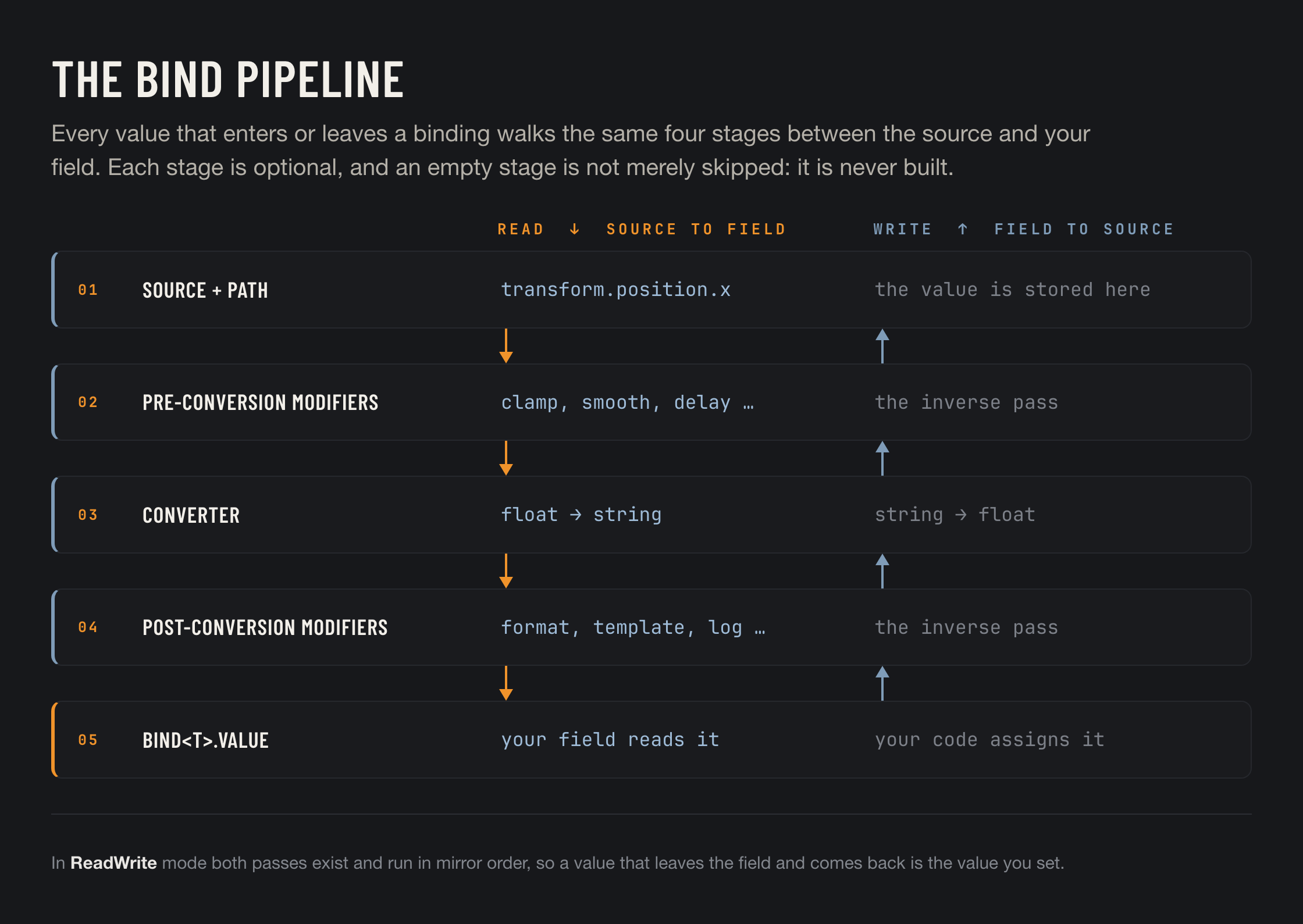
Between the source and your field sits a pipeline. It is the same pipeline in both directions.

<figure><img src="https://3048705056-files.gitbook.io/~/files/v0/b/gitbook-x-prod.appspot.com/o/spaces%2FLUfBXR02sJ5i0MxwYbaV%2Fuploads%2Fgit-blob-828fb68dfb20b6365147dc31689fd770d238f2f0%2Fbind-pipeline.png?alt=media" alt="The bind pipeline"><figcaption></figcaption></figure>

A **converter** changes the type. `float` to `string`, `Color` to `Gradient`, `int` to an enum. Most conversions are found automatically, and the ones with options are configurable. See [Converters](/binding-system-3/pipeline/converters.md).

A **modifier** changes the value without changing its type. Clamp it, remap it, smooth it, format it, log it, fan it out to other bindings. Modifiers stack, and they run either before or after the converter depending on where you add them. See [Modifiers](/binding-system-3/pipeline/modifiers.md).

{% hint style="info" %}
Every stage is optional, and an empty stage is not merely skipped at runtime: it is never built. A binding with no converter and no modifiers is a direct accessor call.
{% endhint %}

## The mode and the update point

**Mode** says which way the value flows.

<table><thead><tr><th width="180">Mode</th><th>What it does</th></tr></thead><tbody><tr><td><code>Read</code></td><td>The source feeds your field.</td></tr><tr><td><code>Write</code></td><td>Your field feeds the source.</td></tr><tr><td><code>ReadWrite</code></td><td>Both, with the pipeline mirrored.</td></tr></tbody></table>

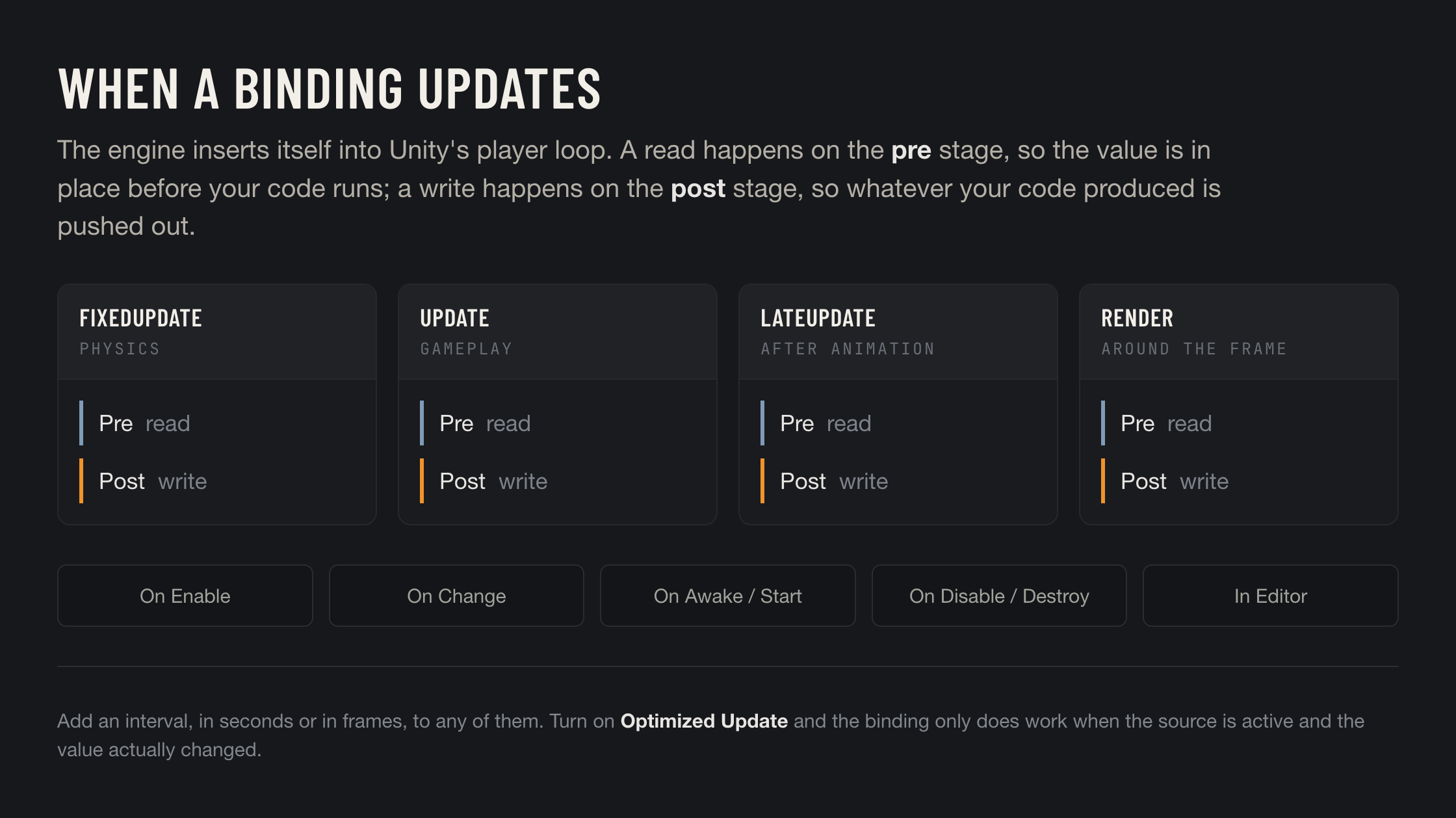
**Update points** say when, and they belong to [proxy bindings](/binding-system-3/overview/proxy-bindings.md). A `Bind<T>` field needs none: its value resolves when your code reads it, which costs nothing until you ask. A proxy binding has no such moment, because the bound component does not know it is bound, so you pick a stage of Unity's player loop and the engine moves the value there.

<figure><img src="https://3048705056-files.gitbook.io/~/files/v0/b/gitbook-x-prod.appspot.com/o/spaces%2FLUfBXR02sJ5i0MxwYbaV%2Fuploads%2Fgit-blob-f4cb88829631e55f398e2a0fb6c20fc64d9576b3%2Fupdate-points.png?alt=media" alt="Update points on the player loop"><figcaption></figcaption></figure>

Reads happen on the **pre** stage, so the value is already in place when your `Update` runs. Writes happen on the **post** stage, so whatever your code produced is pushed out afterwards. See [Bind Modes and Update Points](/binding-system-3/overview/modes-and-updates.md).

## Editor and runtime

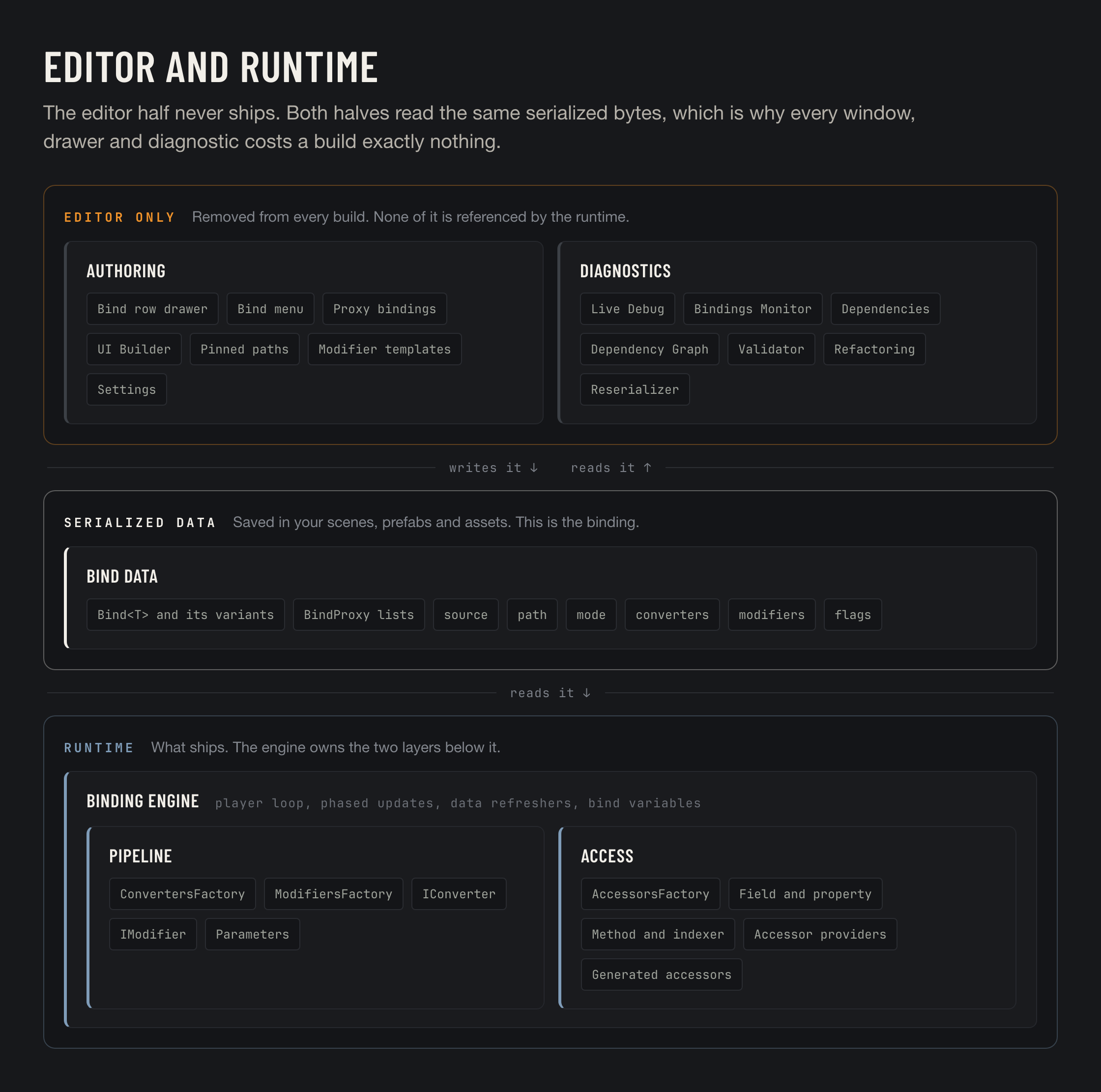
The package has two halves. The editor half is every drawer, window and diagnostic, and none of it is included in a build. The runtime half is the engine, the pipeline and the accessors.

<figure><img src="https://3048705056-files.gitbook.io/~/files/v0/b/gitbook-x-prod.appspot.com/o/spaces%2FLUfBXR02sJ5i0MxwYbaV%2Fuploads%2Fgit-blob-fcefffa7927d7c9d56dffd1c0999fff929154975%2Farchitecture.png?alt=media" alt="The editor half, the serialized data, and the runtime half"><figcaption></figcaption></figure>

Neither half owns the binding. The binding is serialized data, saved in your scenes, prefabs and assets, and both halves read the same bytes. That is why the editor tools cost a build nothing: the runtime never references them.

## A vocabulary sheet

<table><thead><tr><th width="230">Term</th><th>What it means</th></tr></thead><tbody><tr><td><strong>Bind field</strong></td><td>A field of type <code>Bind&#x3C;T></code> or one of its variants.</td></tr><tr><td><strong>Bind data</strong></td><td>The serialized description of a binding: source, path, mode, converters, modifiers, flags.</td></tr><tr><td><strong>Accessor</strong></td><td>The compiled, cached object that actually reads or writes the value at the end of a path. Reflection builds it once; after that it is direct access for fields and typed delegates for everything else. See <a href="/binding-system-3/project-tools/performance.md">Performance</a>.</td></tr><tr><td><strong>Proxy binding</strong></td><td>A binding stored beside an object rather than inside it, so ordinary fields can be bound with no code. See <a href="/binding-system-3/overview/proxy-bindings.md">Proxy Bindings</a>.</td></tr><tr><td><strong>Bind variable</strong></td><td>A named value in a scene component or a project asset, usable as a source. See <a href="/binding-system-3/overview/bind-variables.md">Bind Variables</a>.</td></tr><tr><td><strong>Pinned path</strong></td><td>A path saved for reuse, offered at the top of the bind path menu. See <a href="/binding-system-3/overview/pinning.md">Pinned Paths</a>.</td></tr><tr><td><strong>Context</strong></td><td>The object that owns the binding. Used by the context source modes and by lifetime tracking.</td></tr><tr><td><strong>Bind controller</strong></td><td>An object that can pause, resume or refresh its own bindings. See <a href="/binding-system-3/overview/runtime-control.md">Controlling Bindings at Runtime</a>.</td></tr></tbody></table>