> For the complete documentation index, see [llms.txt](https://postica.gitbook.io/binding-system-3/llms.txt). Markdown versions of documentation pages are available by appending `.md` to page URLs; this page is available as [Markdown](https://postica.gitbook.io/binding-system-3/readme.md).

# Welcome

Data connections, made simple.

<div data-full-width="true"><figure><img src="https://3048705056-files.gitbook.io/~/files/v0/b/gitbook-x-prod.appspot.com/o/spaces%2FLUfBXR02sJ5i0MxwYbaV%2Fuploads%2Fgit-blob-c5711ee162694cc62cb79f3a5393f303c8f146e3%2Fbs3-banner.png?alt=media" alt="Binding System 3"><figcaption></figcaption></figure></div>

Binding System 3 is a Unity editor tool that connects one value in your project to another. You pick the two ends in the Inspector, and the package keeps them in sync while the game runs. You do not write the code in between, and you do not recompile to change a connection.

Almost anything can be one end of a connection: a field, a property or a method on any component, asset, material or UI Toolkit element. That includes Unity's own components and packages whose source code you do not have.

## The problem it solves

A health value lives on one component. A fill bar lives on another. To join them you write a third script, and its whole job is this one line:

```csharp
_bar.fillAmount = _health.Current / _health.Max;
```

Around that line you also need two serialized references that can be null, an `Update` that runs even when nothing changed, and a class name you had to invent. It works, but it never stays at one. The next connection needs another script, and a finished project has dozens of them in the same folder. Each one is simple, and each one is a real file somebody has to maintain.

Binding System replaces that file with a row in the Inspector.

{% tabs %}
{% tab title="Without" %}

```csharp
public class HealthBarDriver : MonoBehaviour
{
    [SerializeField] private Health _health;
    [SerializeField] private Image _bar;
    [SerializeField] private float _max = 100f;

    private void Update()
    {
        if (_health == null || _bar == null)
            return;

        _bar.fillAmount = Mathf.Clamp01(_health.Current / _max);
    }
}
```

One more class in the project, one more component in the scene, and one more file to update when either side changes.
{% endtab %}

{% tab title="With" %}
Nothing. No file, no class, no component.

Right click **Fill Amount** on the `Image`, choose **Enable Binding**, click the hexagon toggle next to the label, point it at `Health.Current` and add a **Normalize Value** modifier. **UPDATE** is already the update point.

```
Health.Current  →  Normalize Value [0 .. Health.max]  →  Image.fillAmount
```

`Image` is Unity's own component. You could not have added that line inside it even if you wanted to, and you did not need to: the binding is stored next to the object.
{% endtab %}
{% endtabs %}

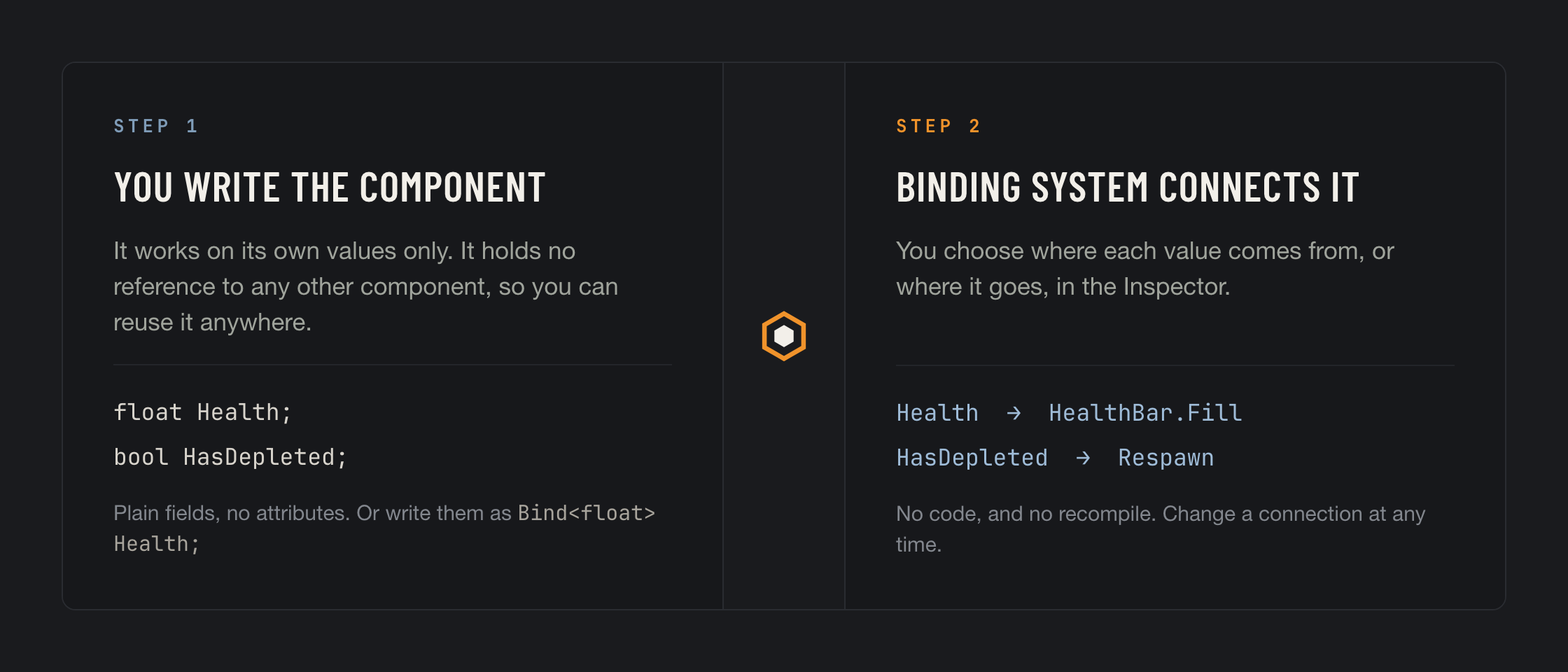
<figure><img src="https://3048705056-files.gitbook.io/~/files/v0/b/gitbook-x-prod.appspot.com/o/spaces%2FLUfBXR02sJ5i0MxwYbaV%2Fuploads%2Fgit-blob-9ecc06c121811444f658920f060029e886621651%2Fseparation-of-concerns.png?alt=media" alt="Step 1: you write the component. Step 2: Binding System connects it."><figcaption></figcaption></figure>

## Pure components

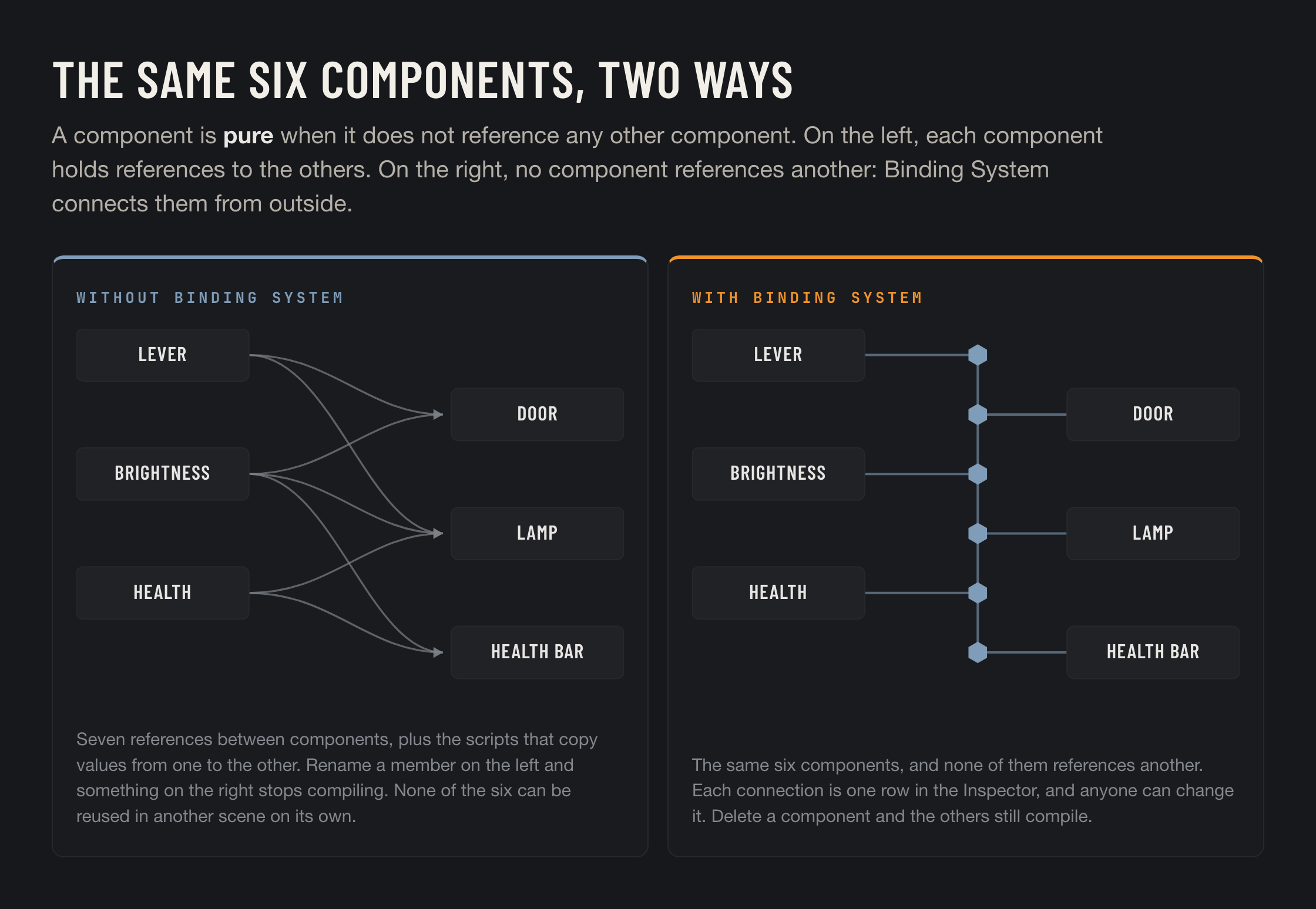
A component is **pure** when it does not reference any other component or object. It declares the values it needs and the values it produces, and nothing else. It does not know where its values come from, and it does not know where they go.

Here is a door that is not pure. Most doors are not.

```csharp
public class Door : MonoBehaviour
{
    [SerializeField] private Lever _lever;
    [SerializeField] private PowerGrid _grid;
    [SerializeField] private float _openSpeed = 1f;

    private void Update()
    {
        if (_lever == null || _grid == null) return;
        if (_lever.Pulled && _grid.HasPower) Open(_openSpeed);
    }
}
```

This `Door` depends on `Lever` and on `PowerGrid`. You cannot use it in a scene that has no lever, and you cannot test it until you build one. If somebody renames `Pulled`, this file stops compiling, together with every other component that also uses a lever.

The same door, written as a pure component:

```csharp
public class Door : MonoBehaviour
{
    public Bind<bool> ShouldOpen;
    public Bind<float> OpenSpeed;

    private void Update()
    {
        if (ShouldOpen) Open(OpenSpeed);
    }
}
```

Nothing inside it mentions a lever, a power grid, or anything else in your game. In the Inspector you connect `ShouldOpen` to `Lever.Pulled`. You can also connect it to a checkbox that you tick by hand while you tune the animation, then point it at the real lever when you are done. The door itself does not change.

<figure><img src="https://3048705056-files.gitbook.io/~/files/v0/b/gitbook-x-prod.appspot.com/o/spaces%2FLUfBXR02sJ5i0MxwYbaV%2Fuploads%2Fgit-blob-f468fef47d005c4784093ea8db21dd848c11bead%2Fpure-components.png?alt=media" alt="The same six components, with references between them and connected from outside"><figcaption></figcaption></figure>

### Benefits of this approach

<table><thead><tr><th width="270">Benefit</th><th>What it means</th></tr></thead><tbody><tr><td><strong>You can test it alone</strong></td><td>Put it in an empty scene, type a value into the field, and watch what it does. You do not need mocks, or a stand-in for the other component, or a whole scene.</td></tr><tr><td><strong>You can reuse it anywhere</strong></td><td>The file does not know which game it belongs to. Copy it into another project and it still compiles.</td></tr><tr><td><strong>Fewer merge conflicts</strong></td><td>The person building the door and the person deciding when doors open no longer edit the same <code>.cs</code> file.</td></tr><tr><td><strong>Connecting is not programming</strong></td><td>To change what opens the door you pick a different source in the Inspector. No ticket, no branch, no build.</td></tr><tr><td><strong>Deleting is safe</strong></td><td>Remove the lever and nothing else stops compiling. The binding turns red and shows you where it used to point.</td></tr></tbody></table>

You do not have to do this everywhere. You can make one field bindable today and leave the fields next to it exactly as they are.

## Where and when Binding System is useful

These are the situations where it saves the most work.

### Copying a value between two components

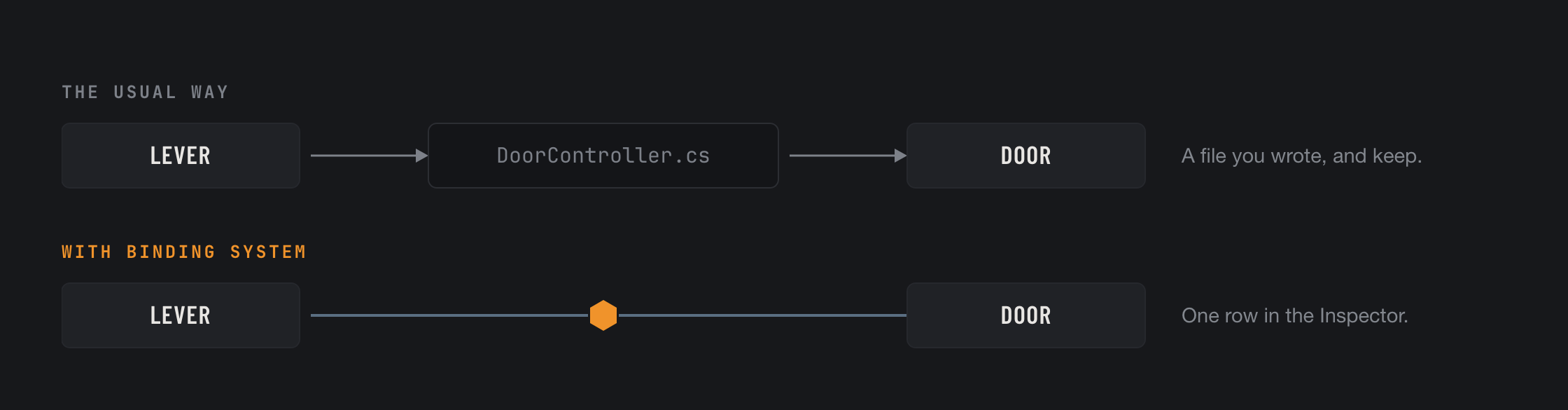
A physics door has a dozen parameters you want to tune. To drive it you add a `DoorController`, give it a reference to the door, and from then on two files change whenever the door does. Make the door's parameters bindable and the controller has nothing left to do. The lever, the slider and the UI button that used to feed it can each stand alone in the same way, and none of them knows the others exist.

<figure><img src="https://3048705056-files.gitbook.io/~/files/v0/b/gitbook-x-prod.appspot.com/o/spaces%2FLUfBXR02sJ5i0MxwYbaV%2Fuploads%2Fgit-blob-d2672b40bd6261e28c25fe0bea6bea9b1bb10c37%2Fsituation-controller.png?alt=media" alt="The usual way needs a third script. With Binding System the lever and the door connect directly."><figcaption></figcaption></figure>

### One value used in many places

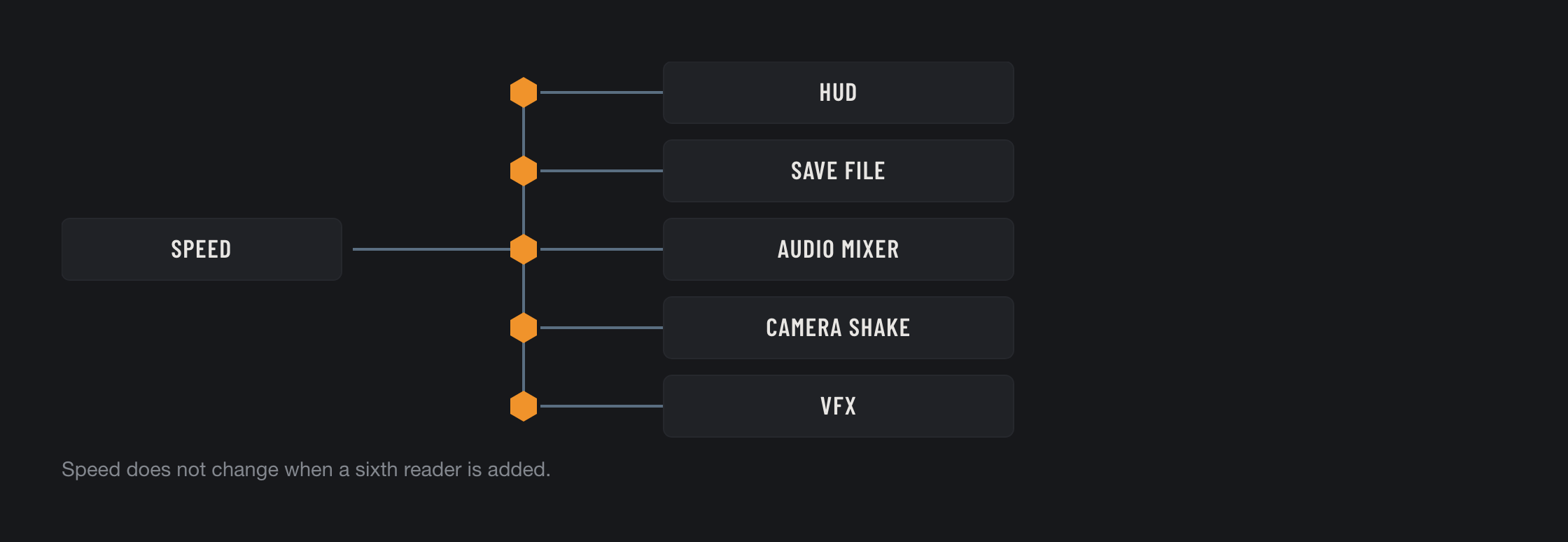
Component A produces a number and component B needs it. Later C and D need it too, then the HUD, then the save system. Normally each new reader means editing A to push the value, editing the reader to pull it, or writing a bridge between them. With bindings, A does not change at all: every reader points at `A.Value` and receives every update. Adding the sixth reader is one row in the Inspector, and nothing recompiles.

<figure><img src="https://3048705056-files.gitbook.io/~/files/v0/b/gitbook-x-prod.appspot.com/o/spaces%2FLUfBXR02sJ5i0MxwYbaV%2Fuploads%2Fgit-blob-f491585296834fb575eaaa1d2caae7349813fe6a%2Fsituation-one-to-many.png?alt=media" alt="One value feeding five readers, each through its own binding"><figcaption></figcaption></figure>

### One value set from several controls

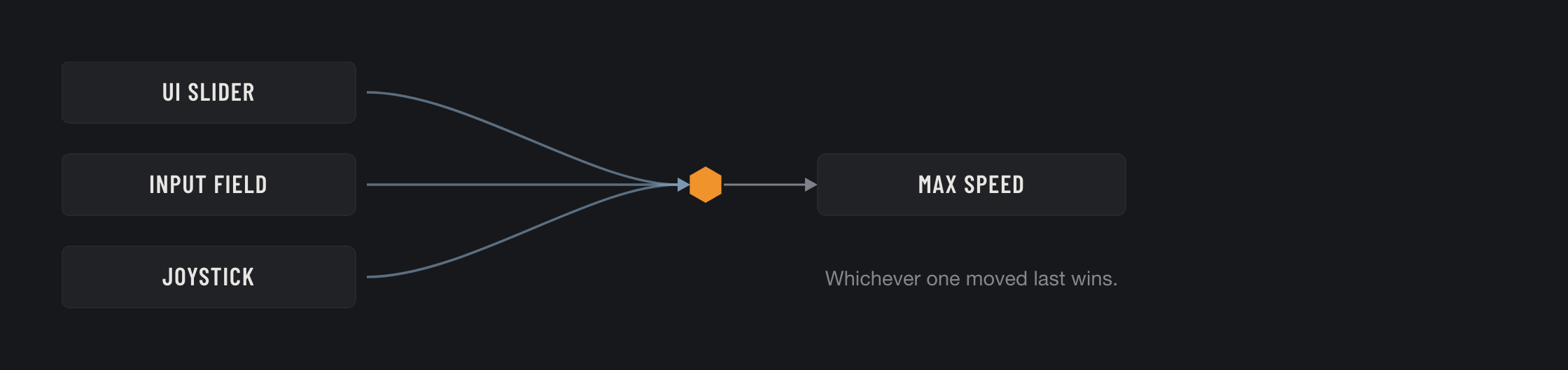
Max speed can be set from a UI slider, from an input field and from a joystick, and the one that moved last should win. Normally this is a small arbitration system that you write once and debug forever. Here it is a [modifier](/binding-system-3/pipeline/modifiers.md#multi-controlled-values): bind all three into the same field and the pipeline handles it.

<figure><img src="https://3048705056-files.gitbook.io/~/files/v0/b/gitbook-x-prod.appspot.com/o/spaces%2FLUfBXR02sJ5i0MxwYbaV%2Fuploads%2Fgit-blob-72af09b217dd251973a66786125bee1d4860831b%2Fsituation-many-to-one.png?alt=media" alt="Three controls writing into one value"><figcaption></figcaption></figure>

### A list of values from different sources

```csharp
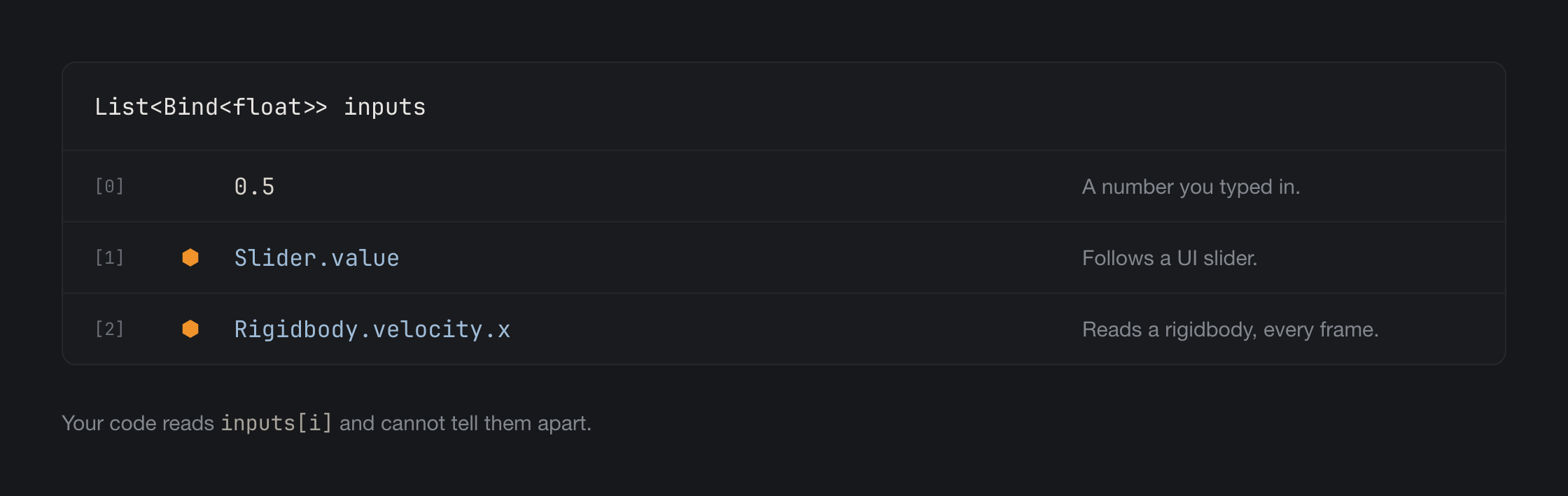
public List<Bind<float>> inputs;
```

The first element is a constant, the second follows a slider, and the third reads the velocity of a rigidbody. One type, one list, three different sources. The code that uses the list reads `inputs[i]` and notices nothing.

<figure><img src="https://3048705056-files.gitbook.io/~/files/v0/b/gitbook-x-prod.appspot.com/o/spaces%2FLUfBXR02sJ5i0MxwYbaV%2Fuploads%2Fgit-blob-589277656300b6b963a3d27ab00471165363f899%2Fsituation-list.png?alt=media" alt="A list whose elements come from three different sources"><figcaption></figcaption></figure>

### Shared data, without a singleton

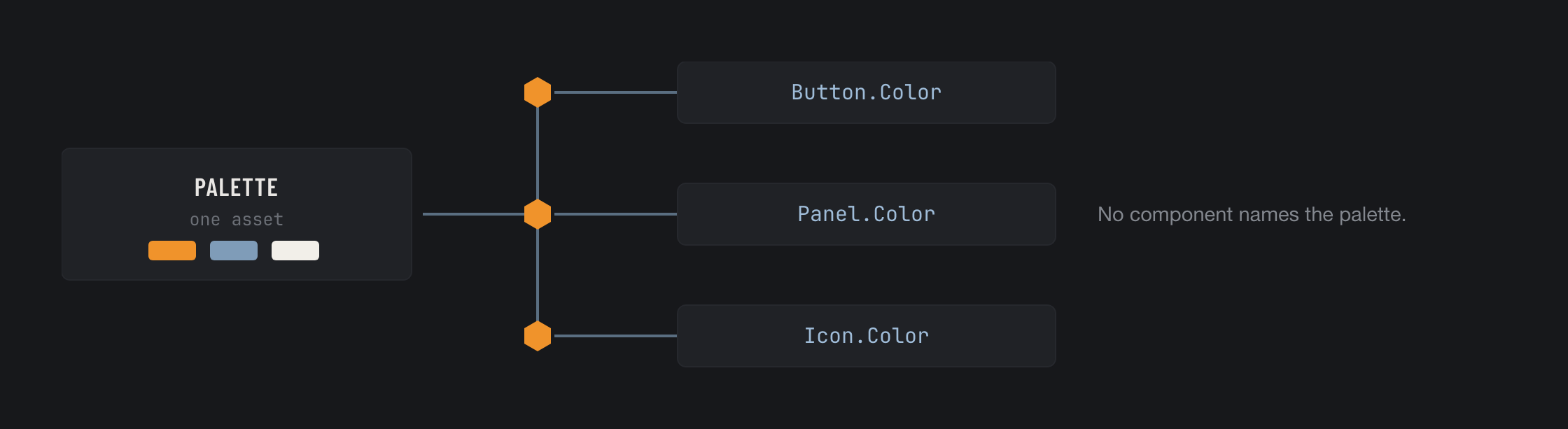
Normally every component that shows a colour holds a reference to the `Palette` asset, or reads it from a global instance. With bindings the component simply has a `Color` field, and something outside it decides that this colour comes from the palette. Change the palette while the editor is open and the scene updates as you watch, because a binding can also run at [edit time](/binding-system-3/overview/modes-and-updates.md).

<figure><img src="https://3048705056-files.gitbook.io/~/files/v0/b/gitbook-x-prod.appspot.com/o/spaces%2FLUfBXR02sJ5i0MxwYbaV%2Fuploads%2Fgit-blob-98583bfc36005ca0a17ad8c647e44104fbbbe0bd%2Fsituation-shared-data.png?alt=media" alt="Three components reading one palette, none of them naming it"><figcaption></figcaption></figure>

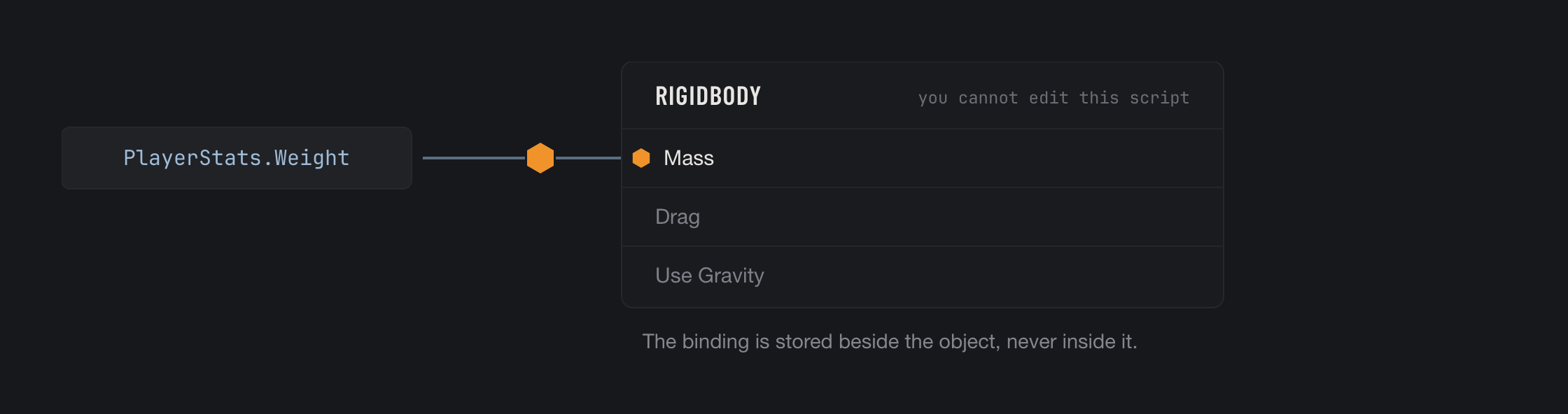
### A field you cannot edit

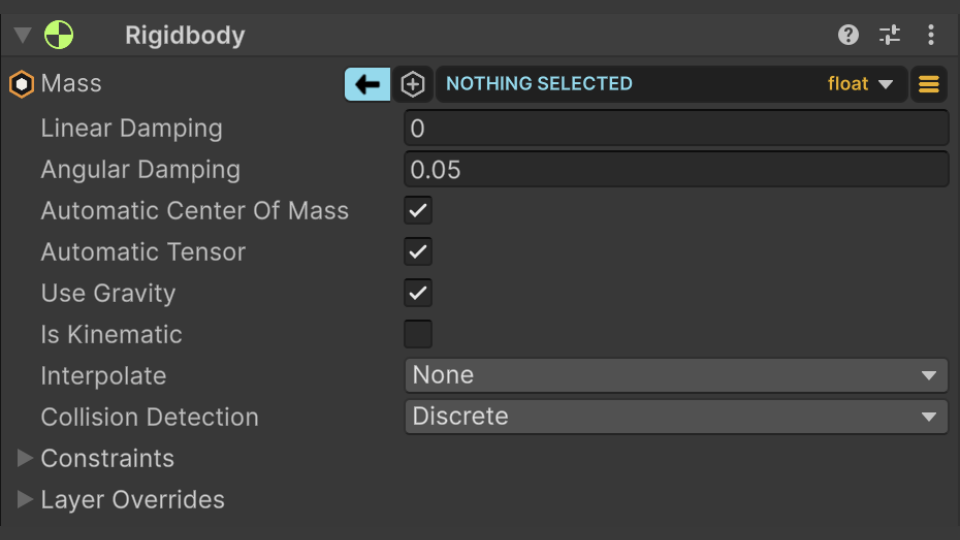
`Rigidbody.mass`. `Light.intensity`. A property on a plugin whose source you do not have. A shader property on a material. This is the case that is hardest to solve in any other way: right click the field, enable the binding, and it is stored next to the object instead of inside it. Nothing is recompiled and nothing is subclassed. See [Proxy Bindings](/binding-system-3/overview/proxy-bindings.md).

<figure><img src="https://3048705056-files.gitbook.io/~/files/v0/b/gitbook-x-prod.appspot.com/o/spaces%2FLUfBXR02sJ5i0MxwYbaV%2Fuploads%2Fgit-blob-e18084919f054a1b11025da068409d8fed1ed085%2Fsituation-locked-field.png?alt=media" alt="A binding on a field of a component you cannot edit"><figcaption></figcaption></figure>

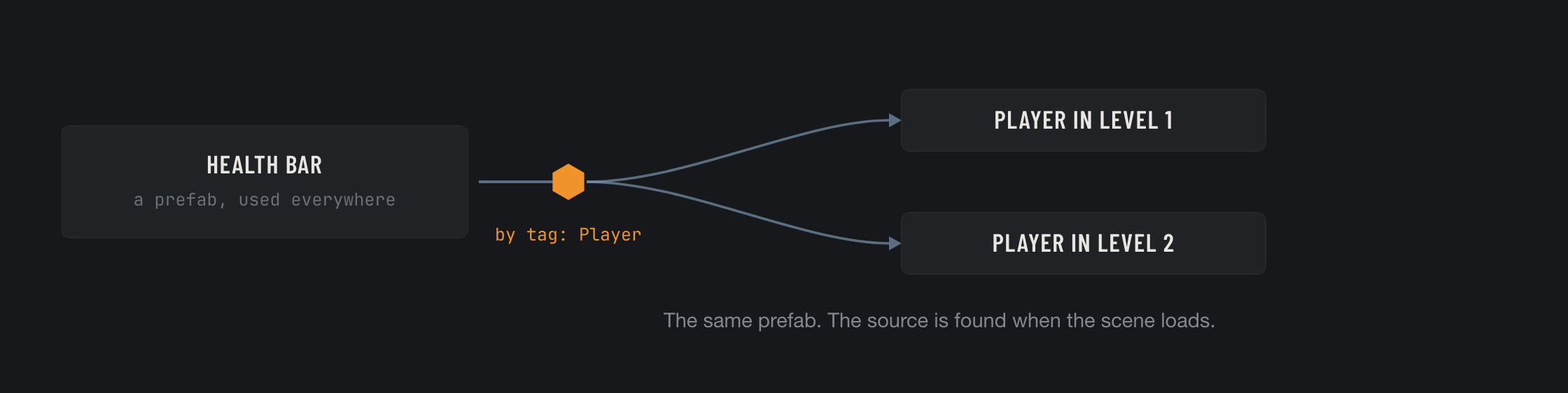
### A source that does not exist yet

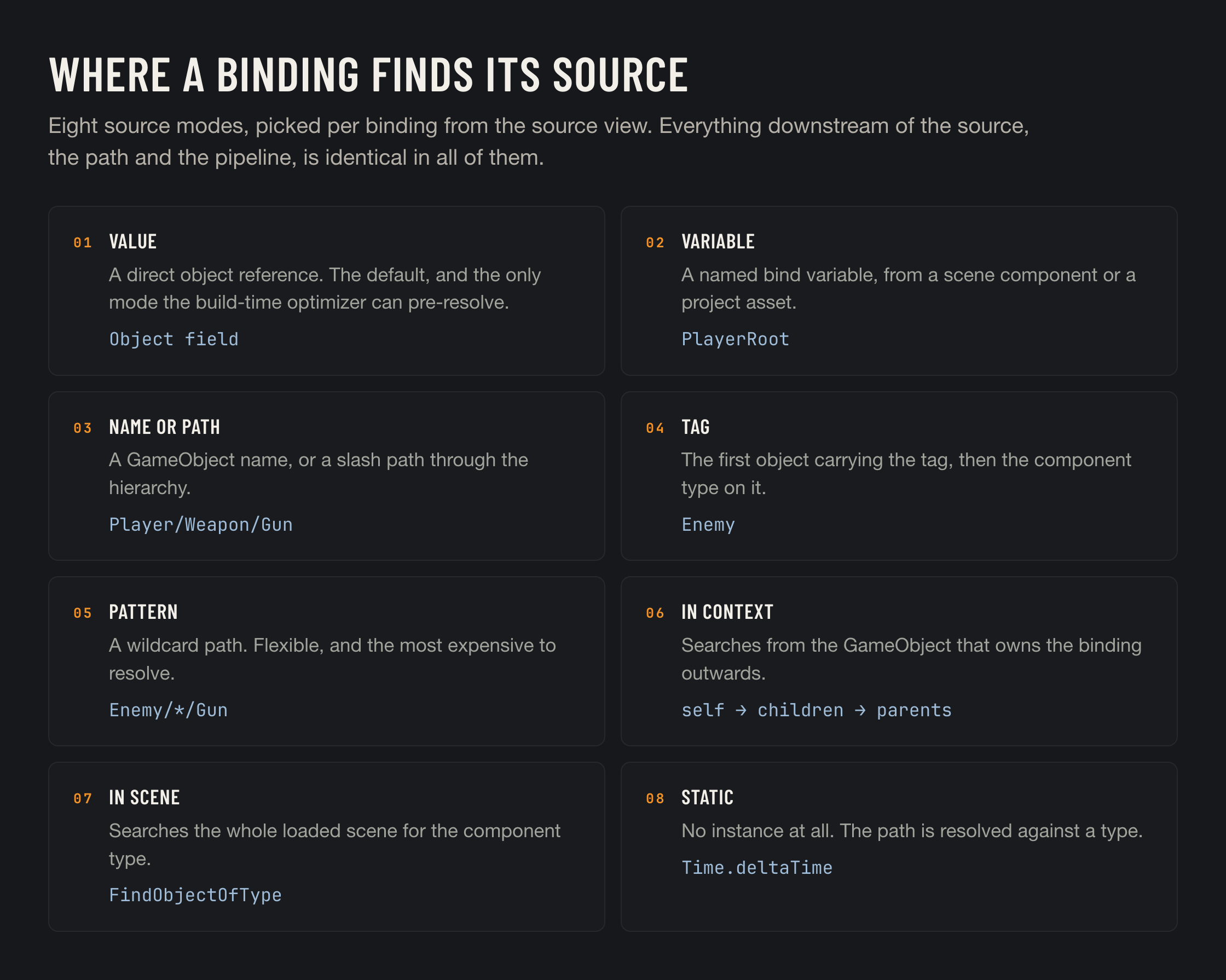
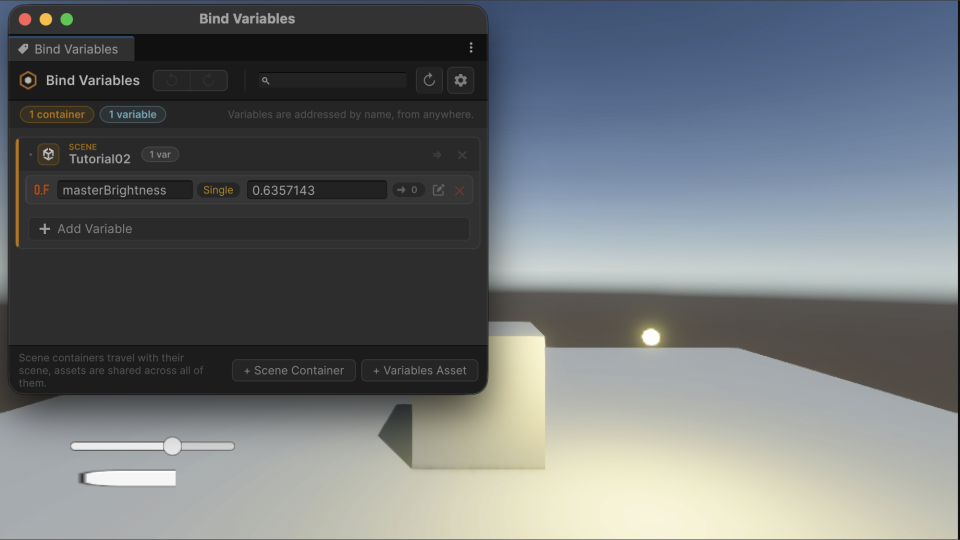
A prefab has to bind to whichever player is in the scene it is dropped into. A direct reference cannot do that, so most tools leave the problem to you. Here the source can be found by tag, by hierarchy path, by name pattern, by a scene search, or by a [named variable](/binding-system-3/overview/bind-variables.md) that each scene fills in for itself. There are eight ways in total, and the rest of the binding is the same in all of them. See [Sources](/binding-system-3/overview/sources.md).

<figure><img src="https://3048705056-files.gitbook.io/~/files/v0/b/gitbook-x-prod.appspot.com/o/spaces%2FLUfBXR02sJ5i0MxwYbaV%2Fuploads%2Fgit-blob-d29fd9123e59351f16f4add2bc4a52c9dedaf908%2Fsituation-late-source.png?alt=media" alt="A prefab that finds its source by tag when the scene loads"><figcaption></figcaption></figure>

## How it differs from other approaches

Most tools of this kind ask for something before they give you anything: a view model, a context class, a wrapper type around every value you want to move, or one asset per value to name and store. None of that is unreasonable, and on a new project it is often the right choice.

It fits badly on a project that already exists, where the values you want to connect are already declared, already serialized and already working.

<table><thead><tr><th width="330">Common requirement</th><th>In Binding System 3</th></tr></thead><tbody><tr><td>Write the source first: a view model, a context, or a wrapper type for each value</td><td>Point at the field that is already there.</td></tr><tr><td>One asset per connected value, to name, organise and keep</td><td>None. <a href="/binding-system-3/overview/bind-variables.md">Named values</a> exist if you want them, and are never required.</td></tr><tr><td>Both ends must be code you own</td><td>Either end can be a Unity component, a package you cannot recompile, a material, a shader property or a UXML element.</td></tr><tr><td>A programmer and a recompile to change a connection</td><td>One row in the Inspector, changed by whoever is using the editor.</td></tr><tr><td>Adopt the architecture across the whole project, or not at all</td><td>One field at a time, and reversible with one click. The field next to it can stay as it is.</td></tr><tr><td>Works on user interfaces only</td><td>Works on anything with a value. Most tools in this category are UI tools that also bind.</td></tr></tbody></table>

The second row from the bottom is the important one. Every other approach is a decision about the whole project, taken once and early. This one is taken per field, and any field can be changed back with one click.

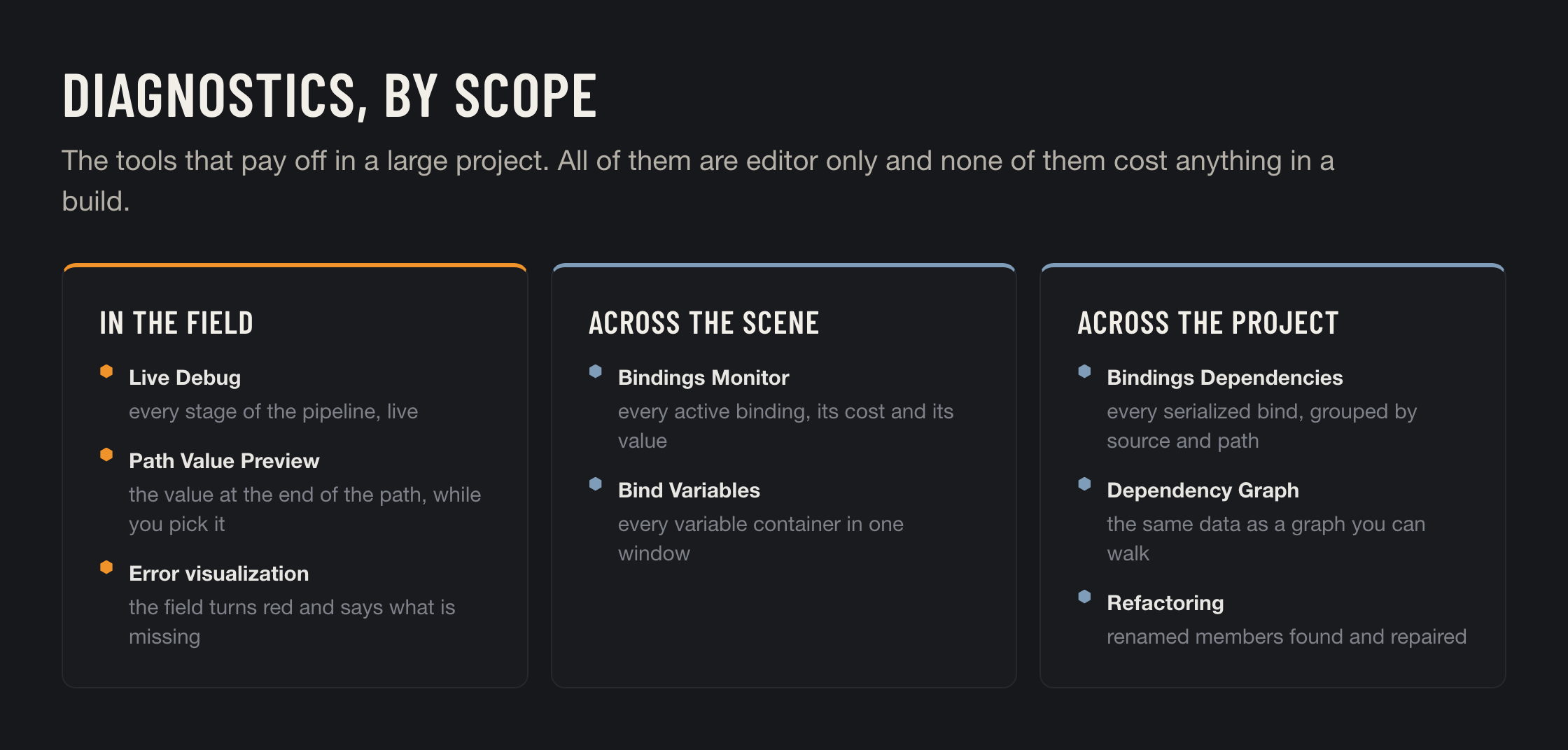
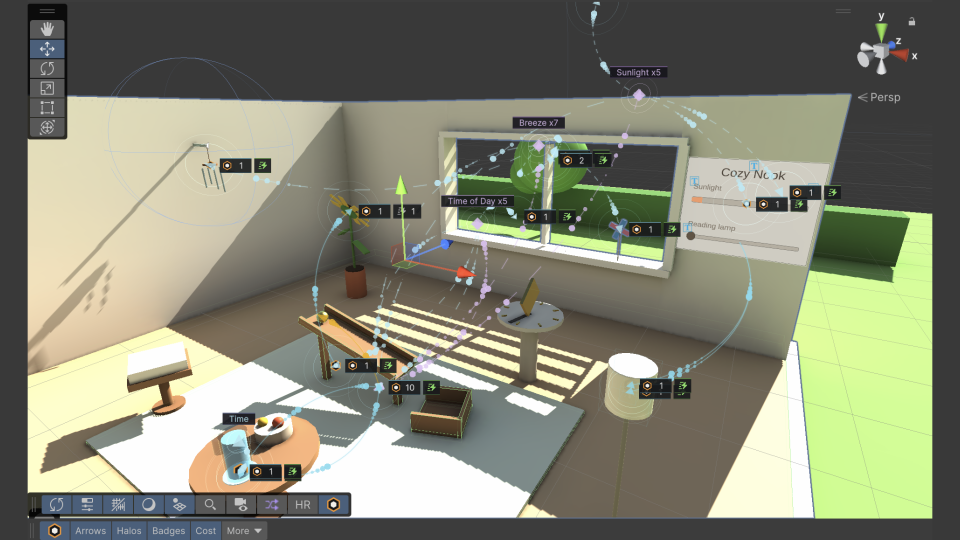
Once a project has a few hundred bindings, the question stops being *can I connect these two things* and becomes *what is connected to what*. That is what the [diagnostics](/binding-system-3/project-tools/diagnostics.md) are for, and almost nothing else in this category has them.

For the full comparison, with names, prices and the cases where another tool is the better choice, see [How It Compares](/binding-system-3/getting-started/comparison.md).

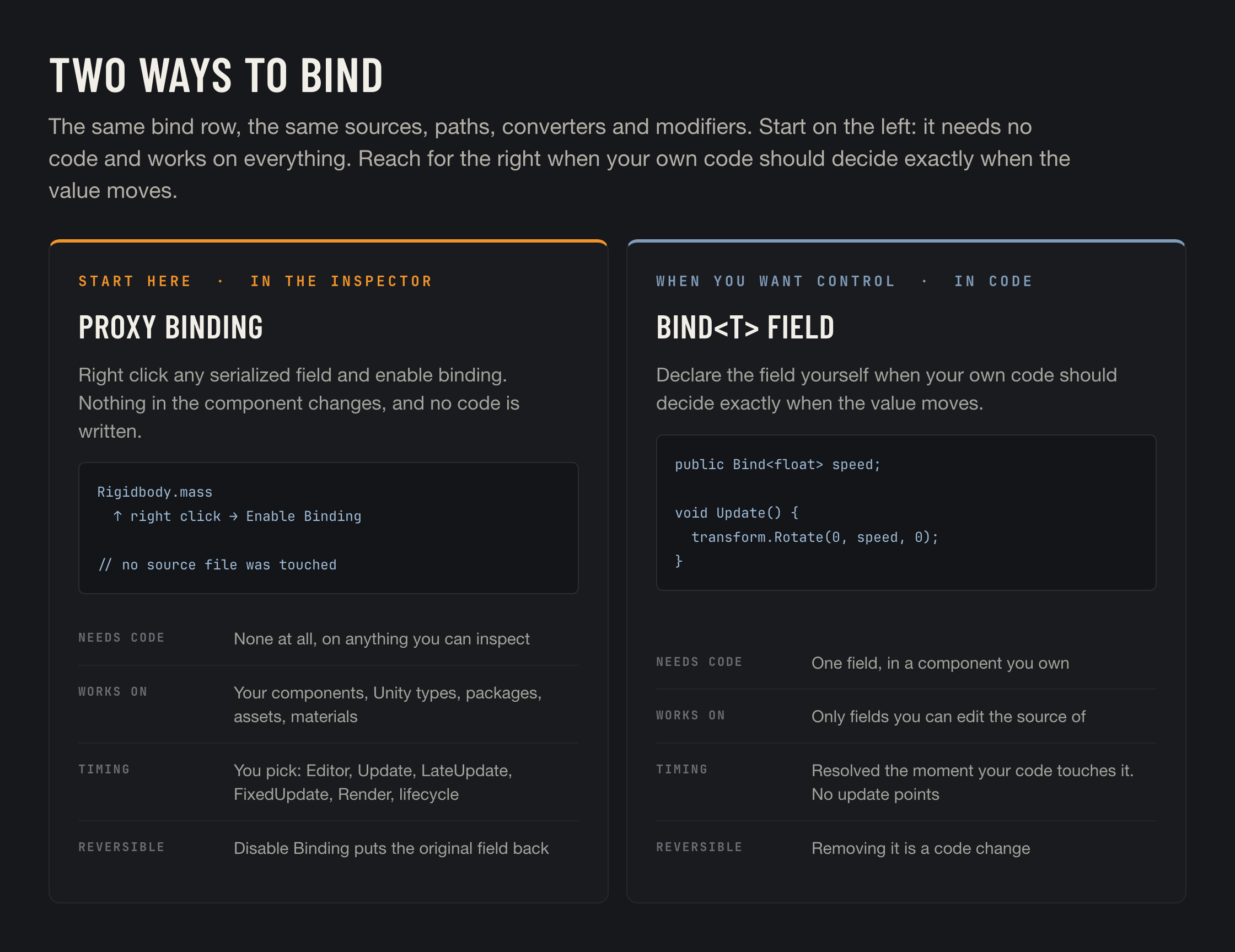
## Two ways to bind

The first way needs no code. Every serialized field of every component and asset in your project can be bound directly from the Inspector: right click, **Enable Binding**, click the hexagon, and connect it. One more click on the same hexagon turns it off again without losing the setup. Nothing is written to disk and nothing is recompiled, so people who never open a source file can build and change all of the connections.

<figure><img src="https://3048705056-files.gitbook.io/~/files/v0/b/gitbook-x-prod.appspot.com/o/spaces%2FLUfBXR02sJ5i0MxwYbaV%2Fuploads%2Fgit-blob-a5117d86722c7c696df8ff1f790392ce280bcff7%2Ftwo-ways-to-bind.png?alt=media" alt="Proxy bindings versus Bind<T> fields"><figcaption></figcaption></figure>

The second way is for components you wrote yourself, when you want to control exactly when the value is read:

```csharp
public class HealthBar : MonoBehaviour
{
    public Bind<float> fill;   // resolves the instant your code reads it
}
```

A `Bind<T>` field updates only when it is read, which makes it both cheaper and more precise. It does need the field to be yours, and one line of code to declare it, so the Inspector route is the one to learn first. Both ways share the same source modes, paths, converters, modifiers and diagnostics, and they can be used side by side on the same GameObject. See [Two Ways to Bind](/binding-system-3/overview/two-ways-to-bind.md).

{% hint style="success" %}
The quickest way to start: [Your First Binding](/binding-system-3/getting-started/first-binding.md) takes about a minute and needs no code.
{% endhint %}

## Built for big projects

Bindings are quick to make, so a real project ends up with thousands of them. Binding System 3 is built for that from the start.

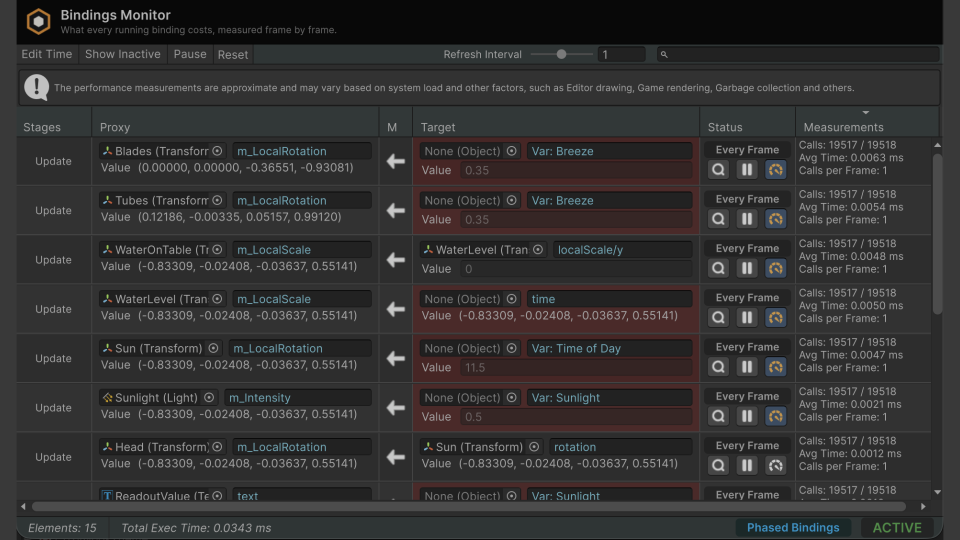
<table><thead><tr><th width="230">Tool</th><th>What it answers</th></tr></thead><tbody><tr><td><a href="/binding-system-3/project-tools/diagnostics/live-debug.md">Live Debug</a></td><td>What value is at every stage of this binding, right now?</td></tr><tr><td><a href="/binding-system-3/project-tools/diagnostics/bindings-monitor.md">Bindings Monitor</a></td><td>Which bindings are active, how often do they run, and what do they cost?</td></tr><tr><td><a href="/binding-system-3/project-tools/diagnostics/dependencies.md">Bindings Dependencies</a></td><td>Where in the project is this member bound, and by what?</td></tr><tr><td><a href="/binding-system-3/project-tools/diagnostics/dependency-graph.md">Dependency Graph</a></td><td>What is connected to what, as a graph I can walk?</td></tr><tr><td><a href="/binding-system-3/project-tools/diagnostics/refactoring.md">Refactoring</a></td><td>I renamed a field. What broke, and can it be repaired?</td></tr><tr><td><a href="/binding-system-3/project-tools/performance/optimized-accessors.md">Optimized Accessors</a></td><td>Which bindings can the build replace with direct code?</td></tr></tbody></table>

## Get started

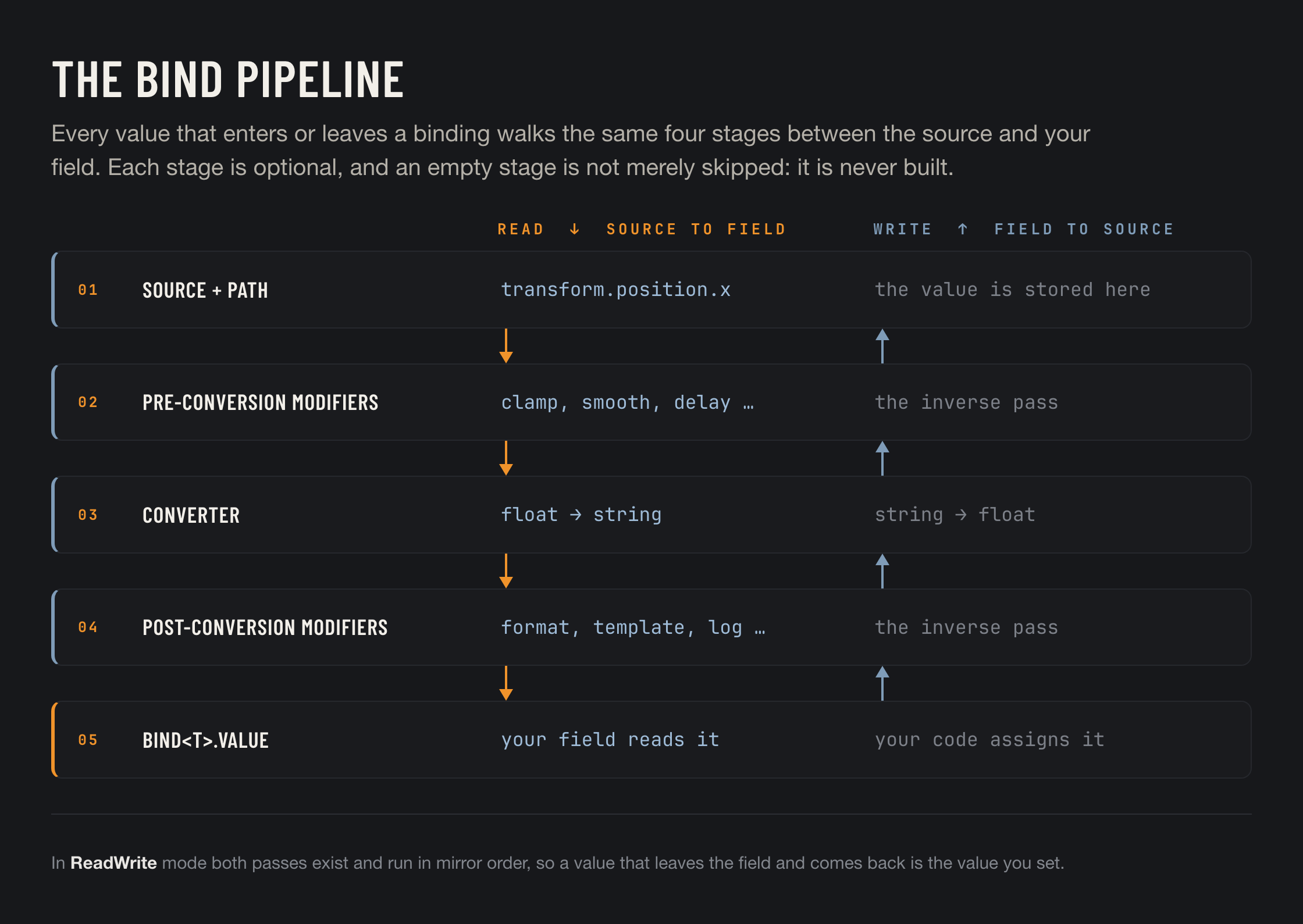
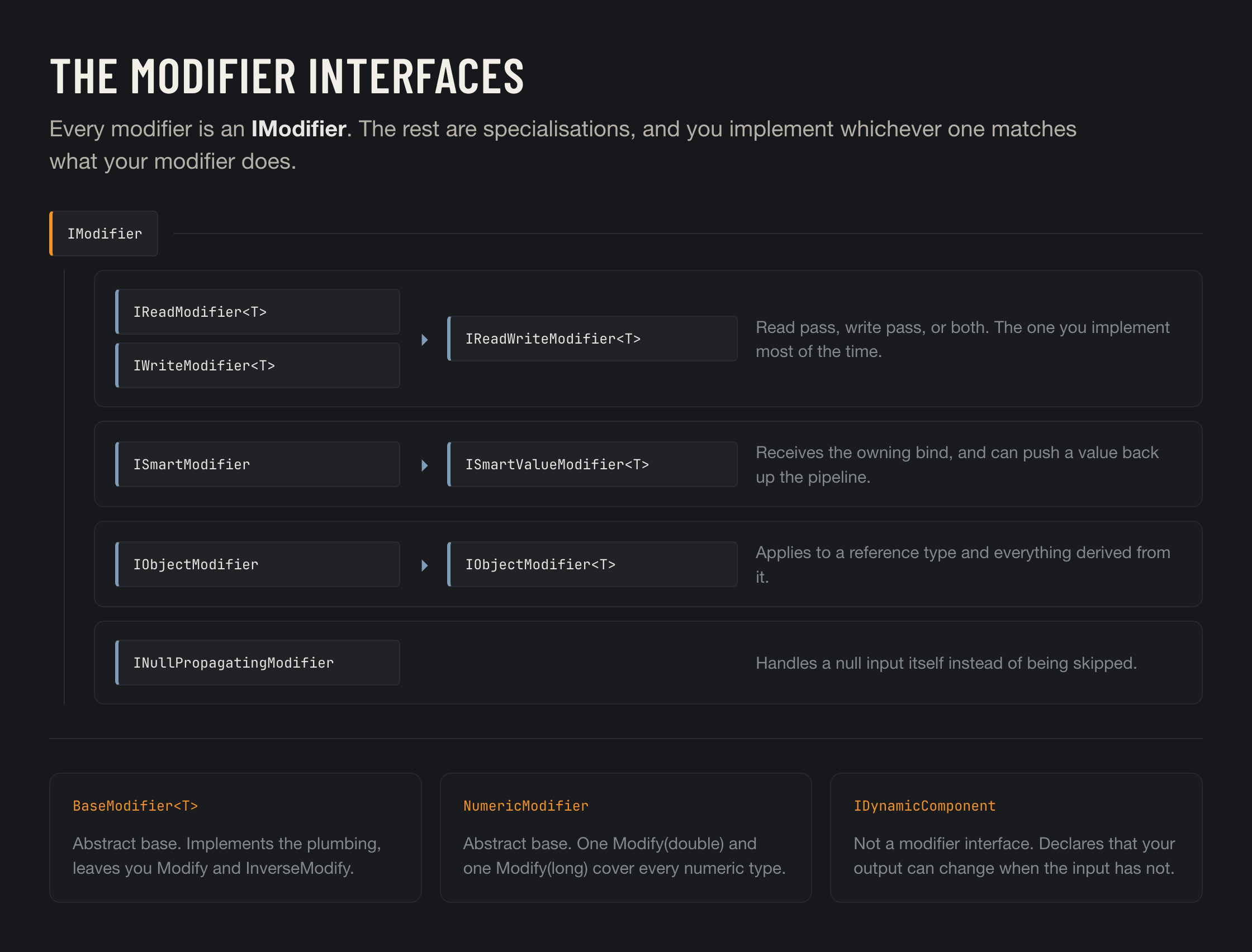
<table data-view="cards"><thead><tr><th align="center"></th><th data-hidden></th><th data-hidden data-card-target data-type="content-ref"></th><th data-hidden data-card-cover data-type="files"></th></tr></thead><tbody><tr><td align="center"><strong>Your First Binding</strong></td><td>One field, one minute, no code.</td><td><a href="/binding-system-3/getting-started/first-binding.md">Your First Binding</a></td><td><a href="https://3048705056-files.gitbook.io/~/files/v0/b/gitbook-x-prod.appspot.com/o/spaces%2FLUfBXR02sJ5i0MxwYbaV%2Fuploads%2Fgit-blob-8c69ca770d891013af4e3d50a88abe6cec6241e5%2Fbs3-tile.png?alt=media">bs3-tile.png</a></td></tr><tr><td align="center"><strong>Core Concepts</strong></td><td>Source, path, pipeline.</td><td><a href="/binding-system-3/getting-started/concepts.md">Core Concepts</a></td><td><a href="https://3048705056-files.gitbook.io/~/files/v0/b/gitbook-x-prod.appspot.com/o/spaces%2FLUfBXR02sJ5i0MxwYbaV%2Fuploads%2Fgit-blob-828fb68dfb20b6365147dc31689fd770d238f2f0%2Fbind-pipeline.png?alt=media">bind-pipeline.png</a></td></tr><tr><td align="center"><strong>The Bind Field</strong></td><td>Everything the Inspector row does.</td><td><a href="/binding-system-3/overview/binding.md">The Bind Field</a></td><td><a href="https://3048705056-files.gitbook.io/~/files/v0/b/gitbook-x-prod.appspot.com/o/spaces%2FLUfBXR02sJ5i0MxwYbaV%2Fuploads%2Fgit-blob-055c91d99a8e6d20ac01b9cc11d87aabe881d954%2Fsource-modes.png?alt=media">source-modes.png</a></td></tr><tr><td align="center"><strong>Two Ways to Bind</strong></td><td>With code, or without it.</td><td><a href="/binding-system-3/overview/two-ways-to-bind.md">Two Ways to Bind</a></td><td><a href="https://3048705056-files.gitbook.io/~/files/v0/b/gitbook-x-prod.appspot.com/o/spaces%2FLUfBXR02sJ5i0MxwYbaV%2Fuploads%2Fgit-blob-a5117d86722c7c696df8ff1f790392ce280bcff7%2Ftwo-ways-to-bind.png?alt=media">two-ways-to-bind.png</a></td></tr><tr><td align="center"><strong>Modifiers</strong></td><td>Shape the value on the way.</td><td><a href="/binding-system-3/pipeline/modifiers.md">Modifiers</a></td><td><a href="https://3048705056-files.gitbook.io/~/files/v0/b/gitbook-x-prod.appspot.com/o/spaces%2FLUfBXR02sJ5i0MxwYbaV%2Fuploads%2Fgit-blob-8821d189c93890c2d9567abb4bb0f619510859de%2Fmodifier-interfaces.png?alt=media">modifier-interfaces.png</a></td></tr><tr><td align="center"><strong>Diagnostics</strong></td><td>Find and fix, at project scale.</td><td><a href="/binding-system-3/project-tools/diagnostics.md">Diagnostics</a></td><td><a href="https://3048705056-files.gitbook.io/~/files/v0/b/gitbook-x-prod.appspot.com/o/spaces%2FLUfBXR02sJ5i0MxwYbaV%2Fuploads%2Fgit-blob-c479a2d033555f88c38e22fc2b77f5ab2e492a26%2Fdiagnostics.png?alt=media">diagnostics.png</a></td></tr></tbody></table>

## What is new in 3

If you are coming from Binding System 2, this is what the new version adds.

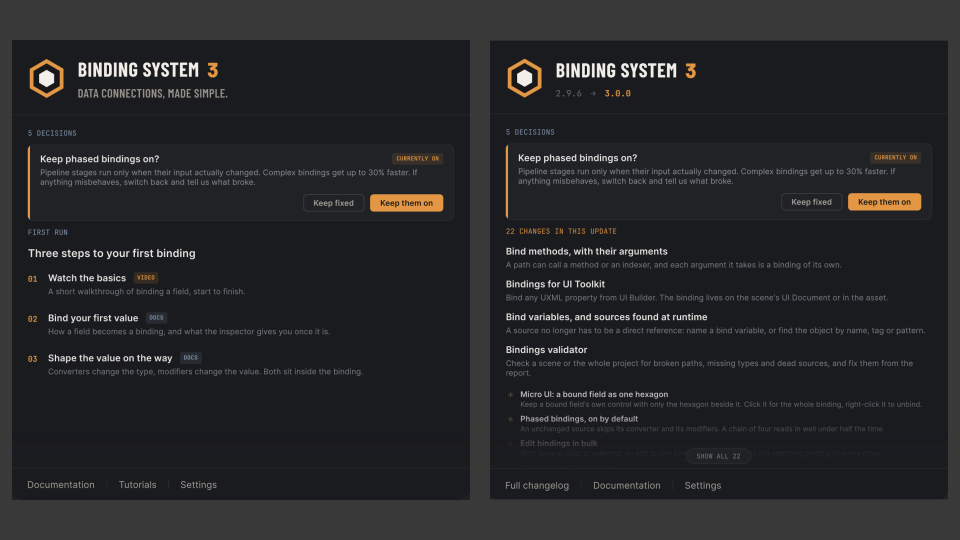
<table><thead><tr><th width="270">Change</th><th>What it means</th></tr></thead><tbody><tr><td><a href="/binding-system-3/overview/ui-toolkit.md">Bindings for UI Toolkit</a></td><td>Bind the properties, inline styles and USS classes of UXML elements, straight from UI Builder. The binding is stored on the scene or in the asset.</td></tr><tr><td><a href="/binding-system-3/overview/paths.md#methods-in-the-bind-path-menu">Method binding</a></td><td>A path can call a method or an indexer, not only read a field or a property. Every argument can itself be a binding.</td></tr><tr><td><a href="/binding-system-3/overview/sources.md">Source modes</a></td><td>A source can be named by variable, name or path, tag, pattern, context, scene search or static type, instead of only by direct reference.</td></tr><tr><td><a href="/binding-system-3/overview/bind-variables.md">Bind variables</a></td><td>Named values in a scene component or a project asset, usable as the source of any binding.</td></tr><tr><td><a href="/binding-system-3/project-tools/diagnostics.md">Better project-wide diagnostics</a></td><td>Every serialized binding in the project, as a <a href="/binding-system-3/project-tools/diagnostics/dependencies.md">list</a>, as a <a href="/binding-system-3/project-tools/diagnostics/dependency-graph.md">graph</a> and as a <a href="/binding-system-3/project-tools/diagnostics/validator.md">validation pass</a>, alongside the <a href="/binding-system-3/project-tools/diagnostics/bindings-monitor.md">Bindings Monitor</a>.</td></tr><tr><td><a href="/binding-system-3/project-tools/performance/optimized-accessors.md">Generated accessors</a></td><td>At build time, the paths your project binds are turned into generated direct-access code.</td></tr><tr><td><a href="/binding-system-3/overview/micro-ui.md">Micro UI</a></td><td>A bound field can keep its own control, showing the value the binding produces, with only the hexagon beside it. Its centre lights green or red for the value shown, and the whole binding opens in a popup.</td></tr><tr><td><a href="/binding-system-3/overview/binding.md#editing-several-bindings-at-once">Bulk editing of binding lists</a></td><td>Edit one binding in a list, or on one of several selected objects, and have the change repeated on the others that match.</td></tr><tr><td><a href="/binding-system-3/overview/binding.md#the-bind-path-menu">Async search and member loading</a></td><td>The bind path menu fills its groups and runs its search in the background, so it opens immediately even on types with very large member trees.</td></tr></tbody></table>

The full list is in the [Change Log](/binding-system-3/help/change-log.md). Coming from 2.x, read [Upgrading from Binding System 2](/binding-system-3/getting-started/upgrading.md) first.

{% hint style="info" %}
**Requires Unity 6000.0 or newer.** Projects on an older editor should stay on the 2.x line.
{% endhint %}

## Explore the documentation

Choose a chapter to find its guides and reference pages.

<table data-view="cards"><thead><tr><th></th><th></th><th data-hidden data-card-target data-type="content-ref"></th><th data-hidden data-card-cover data-type="files"></th></tr></thead><tbody><tr><td><strong>Getting Started</strong></td><td>Install, make your first binding, and learn the core ideas.</td><td><a href="/binding-system-3/getting-started.md">Getting Started</a></td><td><a href="https://3048705056-files.gitbook.io/~/files/v0/b/gitbook-x-prod.appspot.com/o/spaces%2FLUfBXR02sJ5i0MxwYbaV%2Fuploads%2Fgit-blob-ab15c0eb3cc9d24b1b60d92fa80f5a86ff509deb%2Fcover-getting-started.svg?alt=media">cover-getting-started.svg</a></td></tr><tr><td><strong>Tutorials and Demo Scenes</strong></td><td>Build a working example or explore a finished sample.</td><td><a href="/binding-system-3/tutorials.md">Tutorials and Demo Scenes</a></td><td><a href="https://3048705056-files.gitbook.io/~/files/v0/b/gitbook-x-prod.appspot.com/o/spaces%2FLUfBXR02sJ5i0MxwYbaV%2Fuploads%2Fgit-blob-7a789e5fc4a09df2827b2bc2e6fa5f6ee29b6c9c%2Fcover-tutorials.svg?alt=media">cover-tutorials.svg</a></td></tr><tr><td><strong>Binding</strong></td><td>Choose sources, connect fields, and control updates.</td><td><a href="/binding-system-3/overview.md">Binding</a></td><td><a href="https://3048705056-files.gitbook.io/~/files/v0/b/gitbook-x-prod.appspot.com/o/spaces%2FLUfBXR02sJ5i0MxwYbaV%2Fuploads%2Fgit-blob-bb43a743ab7c41ec26f4defdfcd891440b43a419%2Fcover-binding.svg?alt=media">cover-binding.svg</a></td></tr><tr><td><strong>The Pipeline</strong></td><td>Convert types, transform values, and smooth motion.</td><td><a href="/binding-system-3/pipeline.md">The Pipeline</a></td><td><a href="https://3048705056-files.gitbook.io/~/files/v0/b/gitbook-x-prod.appspot.com/o/spaces%2FLUfBXR02sJ5i0MxwYbaV%2Fuploads%2Fgit-blob-2ca76a6c3a7b1f7e0361e0aba8b959e8bb44c9cd%2Fcover-pipeline.svg?alt=media">cover-pipeline.svg</a></td></tr><tr><td><strong>Debug and Optimize</strong></td><td>Inspect connections, audit the project, and measure cost.</td><td><a href="/binding-system-3/project-tools.md">Debug and Optimize</a></td><td><a href="https://3048705056-files.gitbook.io/~/files/v0/b/gitbook-x-prod.appspot.com/o/spaces%2FLUfBXR02sJ5i0MxwYbaV%2Fuploads%2Fgit-blob-94539a21c3d39b80698328270319f367c907466f%2Fcover-diagnostics.svg?alt=media">cover-diagnostics.svg</a></td></tr><tr><td><strong>Developer Reference</strong></td><td>Look up APIs and settings, and extend or integrate the tool.</td><td><a href="/binding-system-3/reference.md">Developer Reference</a></td><td><a href="https://3048705056-files.gitbook.io/~/files/v0/b/gitbook-x-prod.appspot.com/o/spaces%2FLUfBXR02sJ5i0MxwYbaV%2Fuploads%2Fgit-blob-9e654bbbbfb909a765f9214ac562f442692cb2e6%2Fcover-reference.svg?alt=media">cover-reference.svg</a></td></tr><tr><td><strong>Help and Releases</strong></td><td>Find answers, troubleshoot, and check what changed.</td><td><a href="/binding-system-3/help.md">Help and Releases</a></td><td><a href="https://3048705056-files.gitbook.io/~/files/v0/b/gitbook-x-prod.appspot.com/o/spaces%2FLUfBXR02sJ5i0MxwYbaV%2Fuploads%2Fgit-blob-f6a35190580efd3581339dced14cc33e92728a9b%2Fcover-help.svg?alt=media">cover-help.svg</a></td></tr></tbody></table>