> For the complete documentation index, see [llms.txt](https://postica.gitbook.io/binding-system-3/llms.txt). Markdown versions of documentation pages are available by appending `.md` to page URLs; this page is available as [Markdown](https://postica.gitbook.io/binding-system-3/pipeline/modifier-catalogue.md).

# Modifier Catalogue

Every built-in modifier, what it does and what it applies to.

The bind menu only offers modifiers that fit the field, so you rarely need this list to *find* one. It is here to answer "is there already something for this?" before you write your own.

{% hint style="info" %}
Almost every parameter listed here can itself be a binding. A clamp whose maximum comes from a difficulty setting is the normal case, not an advanced one.
{% endhint %}

Every modifier name below links to its full entry: what each parameter does, a worked example, and what happens in the write direction of a two-way binding.

<table data-view="cards"><thead><tr><th></th><th></th><th data-hidden data-card-target data-type="content-ref"></th><th data-hidden data-card-cover data-type="files"></th></tr></thead><tbody><tr><td><strong>Numbers</strong></td><td>Clamp, remap, snap, formulas</td><td><a href="/binding-system-3/pipeline/modifier-catalogue/numbers.md">Numbers</a></td><td><a href="https://3048705056-files.gitbook.io/~/files/v0/b/gitbook-x-prod.appspot.com/o/spaces%2FLUfBXR02sJ5i0MxwYbaV%2Fuploads%2Fgit-blob-cca8ab8a1b7db9bae6e883648fce4a9b85436cd9%2Fmodifier-remap-range.png?alt=media">modifier-remap-range.png</a></td></tr><tr><td><strong>Boolean values</strong></td><td>Invert, logic, rules</td><td><a href="/binding-system-3/pipeline/modifier-catalogue/boolean-values.md">Boolean values</a></td><td><a href="https://3048705056-files.gitbook.io/~/files/v0/b/gitbook-x-prod.appspot.com/o/spaces%2FLUfBXR02sJ5i0MxwYbaV%2Fuploads%2Fgit-blob-ac2242d2e113f09f2d39a9d5897c5e9c1964482c%2Fmodifier-bool-expression.png?alt=media">modifier-bool-expression.png</a></td></tr><tr><td><strong>Text</strong></td><td>Templates, casing, slices</td><td><a href="/binding-system-3/pipeline/modifier-catalogue/text.md">Text</a></td><td><a href="https://3048705056-files.gitbook.io/~/files/v0/b/gitbook-x-prod.appspot.com/o/spaces%2FLUfBXR02sJ5i0MxwYbaV%2Fuploads%2Fgit-blob-372d199b0157a663be5cf2df489e609676b3d077%2Fmodifier-text-template.png?alt=media">modifier-text-template.png</a></td></tr><tr><td><strong>Colors</strong></td><td>Tint, blend, alpha, channels</td><td><a href="/binding-system-3/pipeline/modifier-catalogue/colors.md">Colors</a></td><td><a href="https://3048705056-files.gitbook.io/~/files/v0/b/gitbook-x-prod.appspot.com/o/spaces%2FLUfBXR02sJ5i0MxwYbaV%2Fuploads%2Fgit-blob-13387e58895b3bb60dac086dd12263955cf7b955%2Fmodifier-blend-color.png?alt=media">modifier-blend-color.png</a></td></tr><tr><td><strong>Vectors</strong></td><td>Offsets, rotation, magnitude</td><td><a href="/binding-system-3/pipeline/modifier-catalogue/vectors.md">Vectors</a></td><td><a href="https://3048705056-files.gitbook.io/~/files/v0/b/gitbook-x-prod.appspot.com/o/spaces%2FLUfBXR02sJ5i0MxwYbaV%2Fuploads%2Fgit-blob-fa2d1d3ca6bece80c149cd38d85a1bb17b780c58%2Fmodifier-rotate-vector.png?alt=media">modifier-rotate-vector.png</a></td></tr><tr><td><strong>Values and references</strong></td><td>Set, link, delay, blend, log</td><td><a href="/binding-system-3/pipeline/modifier-catalogue/values-and-references.md">Values and references</a></td><td><a href="https://3048705056-files.gitbook.io/~/files/v0/b/gitbook-x-prod.appspot.com/o/spaces%2FLUfBXR02sJ5i0MxwYbaV%2Fuploads%2Fgit-blob-64449c08fa37916fd13bdfa4c5bc405a7ce2f0e5%2Fmodifier-blend-to.png?alt=media">modifier-blend-to.png</a></td></tr><tr><td><strong>Events and conditions</strong></td><td>Reacting without changing</td><td><a href="/binding-system-3/pipeline/modifier-catalogue/events-and-conditions.md">Events and conditions</a></td><td><a href="https://3048705056-files.gitbook.io/~/files/v0/b/gitbook-x-prod.appspot.com/o/spaces%2FLUfBXR02sJ5i0MxwYbaV%2Fuploads%2Fgit-blob-1ef31340ad4f5277d2097c3f20539eb4dc22b953%2Fmodifier-value-events.png?alt=media">modifier-value-events.png</a></td></tr><tr><td><strong>Timing and motion</strong></td><td>Tween, smooth, delay</td><td><a href="/binding-system-3/pipeline/tweening.md">Tweening and Control</a></td><td><a href="https://3048705056-files.gitbook.io/~/files/v0/b/gitbook-x-prod.appspot.com/o/spaces%2FLUfBXR02sJ5i0MxwYbaV%2Fuploads%2FPDGm2b6JyXcilNgMg20Z%2FScreenshot%202026-09-26%20at%2016.02.01.png?alt=media&amp;token=f994ce40-5d93-470e-b46c-8c63d8eedf4d">Screenshot 2026-09-26 at 16.02.01.png</a></td></tr></tbody></table>

## Numeric

Applies to every numeric type: `int`, `long`, `float`, `double`, and the rest.

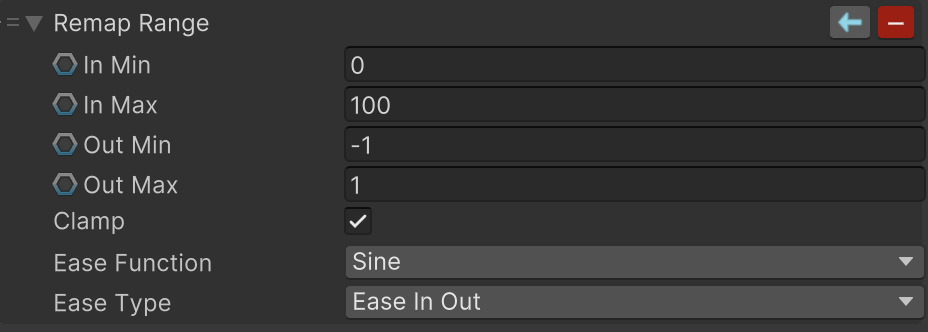
<table><thead><tr><th width="250">Modifier</th><th>What it does</th></tr></thead><tbody><tr><td><a href="/binding-system-3/pipeline/modifier-catalogue/numbers.md#operation"><strong>Math Operation</strong></a></td><td>Add, subtract, multiply, divide and the rest, against a bindable operand.</td></tr><tr><td><a href="/binding-system-3/pipeline/modifier-catalogue/numbers.md#math-expression"><strong>Math Expression</strong></a></td><td>Evaluates an expression in which the input value is one of the variables. For when a chain of small modifiers would be less readable than one formula.</td></tr><tr><td><a href="/binding-system-3/pipeline/modifier-catalogue/numbers.md#clamp-value"><strong>Clamp Value</strong></a></td><td>Clamps between a bindable min and max.</td></tr><tr><td><a href="/binding-system-3/pipeline/modifier-catalogue/numbers.md#normalize-value"><strong>Normalize Value</strong></a></td><td>Maps a range onto 0 to 1.</td></tr><tr><td><a href="/binding-system-3/pipeline/modifier-catalogue/numbers.md#remap-range"><strong>Remap Range</strong></a></td><td>Maps one range onto another, with optional clamping and easing.</td></tr><tr><td><a href="/binding-system-3/pipeline/modifier-catalogue/numbers.md#absolute-value"><strong>Absolute Value</strong></a></td><td>Drops the sign.</td></tr><tr><td><a href="/binding-system-3/pipeline/modifier-catalogue/numbers.md#modulus-value"><strong>Modulus Value</strong></a></td><td>The remainder against a bindable modulus.</td></tr><tr><td><a href="/binding-system-3/pipeline/modifier-catalogue/numbers.md#snap-value"><strong>Snap Value</strong></a></td><td>Quantizes to a step, rounding, flooring, ceiling or truncating.</td></tr><tr><td><a href="/binding-system-3/pipeline/modifier-catalogue/numbers.md#evaluate-curve"><strong>Evaluate Curve</strong></a></td><td>Runs the value through an <code>AnimationCurve</code>. The most direct way to shape a response by hand.</td></tr></tbody></table>

## Boolean

<table><thead><tr><th width="250">Modifier</th><th>What it does</th></tr></thead><tbody><tr><td><a href="/binding-system-3/pipeline/modifier-catalogue/boolean-values.md#invert-boolean"><strong>Invert Boolean</strong></a></td><td>Negates it.</td></tr><tr><td><a href="/binding-system-3/pipeline/modifier-catalogue/boolean-values.md#logic-operation"><strong>Logic Operation</strong></a></td><td>AND, OR, XOR and friends against a bindable operand.</td></tr><tr><td><a href="/binding-system-3/pipeline/modifier-catalogue/boolean-values.md#bool-expression"><strong>Bool Expression</strong></a></td><td>Evaluates a boolean expression with the input as one of the variables.</td></tr></tbody></table>

## String

<table><thead><tr><th width="250">Modifier</th><th>What it does</th></tr></thead><tbody><tr><td><a href="/binding-system-3/pipeline/modifier-catalogue/text.md#text-template"><strong>Text Template</strong></a></td><td>Builds a string from a template where the input and bindable variables are placeholders, with pipe transforms such as <code>{x|upper}</code> and <code>{x|truncate:20}</code>. This is the string modifier.</td></tr><tr><td><a href="/binding-system-3/pipeline/modifier-catalogue/text.md#change-casing"><strong>Change Casing</strong></a></td><td>Upper, lower, title and so on.</td></tr><tr><td><a href="/binding-system-3/pipeline/modifier-catalogue/text.md#substring"><strong>Substring</strong></a></td><td>A slice, by index and length.</td></tr></tbody></table>

{% hint style="info" %}
**String Format** and **String Concat** are gone from the menu. Both are deprecated in favour of Text Template and are no longer registered, so they cannot be added to a new binding. Instances already saved in a scene or a prefab keep deserializing and running, and their row in the Inspector offers an **UPGRADE** button that converts them.
{% endhint %}

## Colour

<table><thead><tr><th width="250">Modifier</th><th>What it does</th></tr></thead><tbody><tr><td><a href="/binding-system-3/pipeline/modifier-catalogue/colors.md#tint-color"><strong>Tint Color</strong></a></td><td>Multiplies each channel by another colour.</td></tr><tr><td><a href="/binding-system-3/pipeline/modifier-catalogue/colors.md#color-additive"><strong>Color Additive</strong></a></td><td>Adds each channel.</td></tr><tr><td><a href="/binding-system-3/pipeline/modifier-catalogue/colors.md#blend-color"><strong>Blend Color</strong></a></td><td>Blends toward another colour with a blend mode and an amount.</td></tr><tr><td><a href="/binding-system-3/pipeline/modifier-catalogue/colors.md#adjust-color"><strong>Adjust Color</strong></a></td><td>Brightness, hue and saturation.</td></tr><tr><td><a href="/binding-system-3/pipeline/modifier-catalogue/colors.md#set-alpha"><strong>Set Alpha</strong></a></td><td>Sets, multiplies or offsets the alpha channel.</td></tr><tr><td><a href="/binding-system-3/pipeline/modifier-catalogue/colors.md#swizzle-color"><strong>Swizzle Color</strong></a></td><td>Remixes the channels, for example RGBA to BGRA.</td></tr><tr><td><a href="/binding-system-3/pipeline/modifier-catalogue/colors.md#color-expression"><strong>Color Expression</strong></a></td><td>A maths expression per channel, with the input as four variables.</td></tr></tbody></table>

## Vector

`Vector2`, `Vector3`, `Vector4` and their integer variants, each with the modifiers that make sense for it.

<table><thead><tr><th width="250">Modifier</th><th>What it does</th></tr></thead><tbody><tr><td><a href="/binding-system-3/pipeline/modifier-catalogue/vectors.md#add-vector"><strong>Add Vector</strong></a></td><td>Component-wise addition.</td></tr><tr><td><a href="/binding-system-3/pipeline/modifier-catalogue/vectors.md#scale-vector"><strong>Scale Vector</strong></a></td><td>Component-wise multiplication.</td></tr><tr><td><a href="/binding-system-3/pipeline/modifier-catalogue/vectors.md#rotate-vector"><strong>Rotate Vector</strong></a></td><td>Rotates by an angle in degrees.</td></tr><tr><td><a href="/binding-system-3/pipeline/modifier-catalogue/vectors.md#vector-magnitude"><strong>Vector Magnitude</strong></a></td><td>Normalizes, clamps or sets the magnitude.</td></tr><tr><td><a href="/binding-system-3/pipeline/modifier-catalogue/vectors.md#min-distance-max-distance-and-clamp-distance"><strong>Min Distance, Max Distance, Clamp Distance</strong></a></td><td>Keeps the vector within a distance of a center point.</td></tr><tr><td><a href="/binding-system-3/pipeline/modifier-catalogue/vectors.md#swizzle-vector"><strong>Swizzle Vector</strong></a></td><td>Remixes the components.</td></tr><tr><td><a href="/binding-system-3/pipeline/modifier-catalogue/vectors.md#vector-expression"><strong>Vector Expression</strong></a></td><td>A maths expression per component.</td></tr></tbody></table>

## Timing and motion

These only advance while the binding runs, so they need an update point on a proxy binding, or a repeated read on a `Bind<T>` field. Adding one does not select an update point for you. See [Tweening and Control](/binding-system-3/pipeline/tweening.md) for the details.

<table><thead><tr><th width="250">Modifier</th><th>What it does</th></tr></thead><tbody><tr><td><a href="/binding-system-3/pipeline/modifier-catalogue/values-and-references.md#value-delayer"><strong>Value Delayer</strong></a></td><td>Delays the value by a number of seconds.</td></tr><tr><td><a href="/binding-system-3/pipeline/tweening.md#tween-animation"><strong>Tween Animation</strong></a></td><td>Animates toward the input value using easing functions.</td></tr><tr><td><a href="/binding-system-3/pipeline/tweening.md#value-smoother"><strong>Value Smoother</strong></a></td><td>Follows the input smoothly using damped dynamics. No overshoot, no configuration beyond a smoothing time.</td></tr><tr><td><a href="/binding-system-3/pipeline/modifier-catalogue/values-and-references.md#blend-to"><strong>Blend To</strong></a></td><td>Blends toward a target value by a factor.</td></tr></tbody></table>

Available for `float`, `Vector2`, `Vector3`, `Color` and `Quaternion`, depending on the modifier.

## Routing and conditions

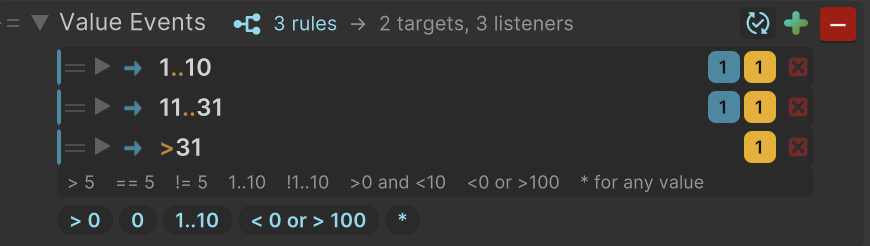
<table><thead><tr><th width="250">Modifier</th><th>What it does</th></tr></thead><tbody><tr><td><a href="/binding-system-3/pipeline/modifier-catalogue/values-and-references.md#set-value"><strong>Set Value</strong></a></td><td>Sets a value up the chain, ignoring the one it received.</td></tr><tr><td><a href="/binding-system-3/pipeline/modifier-catalogue/values-and-references.md#link-to-bindable"><strong>Link To Bindable</strong></a></td><td>Links this binding to another bindable value, in both directions.</td></tr><tr><td><a href="/binding-system-3/pipeline/modifier-catalogue/events-and-conditions.md#value-events"><strong>Value Events</strong></a></td><td>Routes the value to other bindings and to <code>UnityEvent</code>s when it matches, passing it along untouched.</td></tr><tr><td><a href="/binding-system-3/pipeline/modifier-catalogue/events-and-conditions.md#value-conditions"><strong>Value Conditions</strong></a></td><td>Tells boolean bindings and events whether the value matches, passing it along untouched.</td></tr><tr><td><strong>Numeric Value Events</strong> / <strong>Conditions</strong></td><td>The same, with numeric comparisons.</td></tr><tr><td><strong>String Value Events</strong> / <strong>Conditions</strong></td><td>The same, with pattern matching on text.</td></tr></tbody></table>

## Diagnostics and safety

<table><thead><tr><th width="250">Modifier</th><th>What it does</th></tr></thead><tbody><tr><td><a href="/binding-system-3/pipeline/modifier-catalogue/values-and-references.md#value-logger"><strong>Value Logger</strong></a></td><td>Logs the value flowing through the binding without changing it. Optionally to a file rather than the Console.</td></tr><tr><td><a href="/binding-system-3/pipeline/modifier-catalogue/values-and-references.md#null-check-modifier"><strong>Null Check Modifier</strong></a></td><td>Substitutes a fallback when the value is null. Reference types only.</td></tr><tr><td><strong>Compound Modifier</strong></td><td>Several modifiers presented as one.</td></tr></tbody></table>

{% hint style="success" %}
**Value Logger** is often faster to reach for than a breakpoint. Drop it into a binding, watch the Console, remove it. It changes nothing about the value.
{% endhint %}

## Getting these for your own types

Seven of these are generic in a way Unity cannot serialize on its own: **Set Value**, **Link To Bindable**, **Value Delayer**, **Value Logger**, **Value Events**, **Value Conditions** and **Null Check**. For a type of your own, the package generates them on request. See [Standard Modifiers for Your Types](/binding-system-3/pipeline/standard-modifiers.md).

## Related pages

* [Modifiers](/binding-system-3/pipeline/modifiers.md): how the stack works.
* [Tweening and Control](/binding-system-3/pipeline/tweening.md): the timing and motion modifiers in full.
* [Templates](/binding-system-3/pipeline/templates.md): saving a configured modifier for reuse.
* [Custom Modifiers](/binding-system-3/reference/extending/modifiers.md): writing your own.